Conceptual data model building method
Explanation
Section titled “Explanation”A conceptual data model describes what data the business needs. It does not describe how the data is stored or built. The steps below keep the work at that level.
1. Understand the business and set the scope. The model answers one question: what exists in the business domain? Business concepts decide what is in scope.
2. Identify the main entities. An entity is a core object or concept of the domain. Find these first. The article “Entity” explains the term.
3. List attributes for each entity. An attribute is a property of an entity. Keep attributes abstract. Do not give them data types at this level.
4. Define relationships and cardinality. Cardinality states how many instances of one entity relate to another. It also states whether the relationship is mandatory or optional.
5. Capture business rules. Business rules are the conditions and constraints that govern entities. Record them in the model.
6. Validate with stakeholders. Review the model with stakeholders and data teams. Refine it from their feedback. Use business terminology. If you leave business users out, requirements end up misaligned and implementation problems follow.
7. Document and share. Keep a glossary of domain terms and definitions. Draw ER (entity-relationship) diagrams for stakeholders. Chen’s ER approach views the real world as entities and relationships. Conceptual ER models often define master reference entities that the whole organization uses.
8. Hand over. The finished model is the initial blueprint for the more detailed logical and physical models. The logical model adds keys and data types. The physical model specifies storage, indexing and constraints. The conceptual model leaves technology out. The article “Conceptual, Logical and Physical Data Model” compares the three.
Example
Section titled “Example”A company wants to model its book lending. The team talks to librarians and finds the entities Member, Book and Loan. Each gets a few abstract attributes, such as a member’s name. A Member can have many Loans. Each Loan must refer to exactly one Book. Librarians review the diagram and correct a term. The team adds the agreed terms to a glossary. Later, the logical model adds keys and data types.
Trade-offs
Section titled “Trade-offs”The facts here do not cover costs of the method. One risk is clear: skipping business users in validation leads to misaligned requirements. Keep attributes abstract at this stage. Detail such as data types belongs to later models.
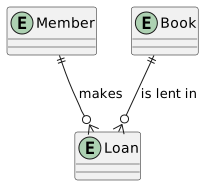
Diagram source
@startumlentity Memberentity Loanentity BookMember ||--o{ Loan : makesBook ||--o{ Loan : is lent in@endumlChecks
Section titled “Checks”- The model lists entities and their attributes without data types or storage details.
- Relationships state cardinality and whether they are mandatory or optional.
- Business rules and constraints are captured in the model.
- The model was validated with business stakeholders and data teams, and feedback was applied.
- A glossary of domain terms and definitions accompanies the model.
Related
Section titled “Related”- Conceptual Data Model
- Conceptual, Logical and Physical Data Model
- Conceptual Data Model Preparation for Logical and Physical Models
- Publishing the conceptual data model
- Entity
- Logical Data Model
- Physical Data Model
- arc42 Glossary
Sources
Section titled “Sources”- What is Conceptual Data Modeling: Purpose & Examples | Airbyte — airbyte.com, accessed 2026-11-09
- Conceptual Data Modeling | ArchMan — archman.dev, accessed 2026-11-09
- Conceptual vs Logical vs Physical Data Models: Key Differences — thoughtspot.com, accessed 2026-11-09
- Entity–relationship model - Wikipedia — en.wikipedia.org, accessed 2026-11-09