BPMN Event
Explanation
Section titled “Explanation”A BPMN event marks a point where something happens during a process. See BPMN Core Elements for the full set of diagram elements.
Catch and throw
Events fall into two groups.
- A catch event comes from outside the process. The process passively waits for it.
- A throw event is something the process does itself, as part of its own execution.
Start events
A start event reacts to something external. That trigger begins the process or a subprocess. A subprocess is a smaller process nested inside a larger one.
Boundary events
A boundary event must be an intermediate catch event. The articles Boundary Event and Intermediate Event cover this in detail.
Link events
Link events come in pairs. One throws and marks an exit point. The other catches and marks a re-entry point. A shared link name matches them.
A pair works like two plain intermediate events joined by a sequence flow. Modelers use links to build loops or to skip sections. The article Link Event covers this.
Terminate end events
A terminate end event stops every element instance in its flow scope. After that, the process instance completes. Inside a subprocess, terminate only affects that subprocess.
Event subprocesses
An event subprocess can be interrupting or non-interrupting.
- An interrupting one can trigger only once.
- A non-interrupting one can trigger many times.
Signals
Broadcasting a signal triggers every signal event with a matching name. So one signal can reach many subscribers.
Example
Section titled “Example”An order process starts when a customer order arrives. That arrival is a catch event, because it comes from outside.
The process then checks stock. A link throw event sends the flow to a matching link catch event further on, which skips a section. The process ends with a terminate end event, which stops everything still running in that scope.
If a warehouse system broadcasts a signal, every signal event with that name reacts.
Trade-offs
Section titled “Trade-offs”Signals reach many subscribers at once, because every matching signal event is triggered. That is useful for broad notifications, but the sender cannot limit who reacts.
An interrupting event subprocess fires once. A non-interrupting one can fire repeatedly. Pick based on whether the trigger may happen again.
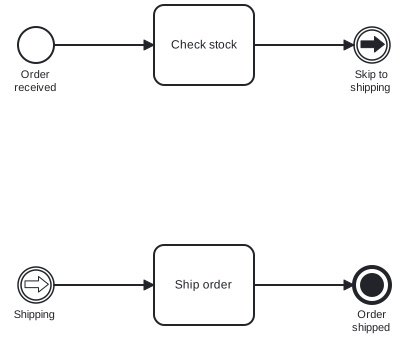
Diagram source
<?xml version="1.0" encoding="UTF-8"?><definitions xmlns="http://www.omg.org/spec/BPMN/20100524/MODEL" xmlns:bpmndi="http://www.omg.org/spec/BPMN/20100524/DI" xmlns:dc="http://www.omg.org/spec/DD/20100524/DC" xmlns:di="http://www.omg.org/spec/DD/20100524/DI" targetNamespace="http://example.org/events"> <process id="p1" isExecutable="false"> <startEvent id="s" name="Order received"> <outgoing>f1</outgoing> </startEvent> <task id="t1" name="Check stock"> <incoming>f1</incoming> <outgoing>f2</outgoing> </task> <intermediateThrowEvent id="lt" name="Skip to shipping"> <incoming>f2</incoming> <linkEventDefinition id="ld1" name="ship" /> </intermediateThrowEvent> <intermediateCatchEvent id="lc" name="Shipping"> <outgoing>f3</outgoing> <linkEventDefinition id="ld2" name="ship" /> </intermediateCatchEvent> <task id="t2" name="Ship order"> <incoming>f3</incoming> <outgoing>f4</outgoing> </task> <endEvent id="e" name="Order shipped"> <incoming>f4</incoming> <terminateEventDefinition id="td" /> </endEvent> <sequenceFlow id="f1" sourceRef="s" targetRef="t1" /> <sequenceFlow id="f2" sourceRef="t1" targetRef="lt" /> <sequenceFlow id="f3" sourceRef="lc" targetRef="t2" /> <sequenceFlow id="f4" sourceRef="t2" targetRef="e" /> </process> <bpmndi:BPMNDiagram id="BPMNDiagram_p1"> <bpmndi:BPMNPlane id="BPMNPlane_p1" bpmnElement="p1"> <bpmndi:BPMNShape id="BPMNShape_s" bpmnElement="s"> <dc:Bounds x="80" y="102" width="36" height="36" /> <bpmndi:BPMNLabel> <dc:Bounds x="68" y="143" width="60" height="28" /> </bpmndi:BPMNLabel> </bpmndi:BPMNShape> <bpmndi:BPMNShape id="BPMNShape_t1" bpmnElement="t1"> <dc:Bounds x="216" y="80" width="100" height="80" /> </bpmndi:BPMNShape> <bpmndi:BPMNShape id="BPMNShape_lt" bpmnElement="lt"> <dc:Bounds x="416" y="102" width="36" height="36" /> <bpmndi:BPMNLabel> <dc:Bounds x="404" y="143" width="60" height="28" /> </bpmndi:BPMNLabel> </bpmndi:BPMNShape> <bpmndi:BPMNShape id="BPMNShape_lc" bpmnElement="lc"> <dc:Bounds x="80" y="342" width="36" height="36" /> <bpmndi:BPMNLabel> <dc:Bounds x="67" y="383" width="62" height="14" /> </bpmndi:BPMNLabel> </bpmndi:BPMNShape> <bpmndi:BPMNShape id="BPMNShape_t2" bpmnElement="t2"> <dc:Bounds x="216" y="320" width="100" height="80" /> </bpmndi:BPMNShape> <bpmndi:BPMNShape id="BPMNShape_e" bpmnElement="e"> <dc:Bounds x="416" y="342" width="36" height="36" /> <bpmndi:BPMNLabel> <dc:Bounds x="408" y="383" width="53" height="28" /> </bpmndi:BPMNLabel> </bpmndi:BPMNShape> <bpmndi:BPMNEdge id="BPMNEdge_f1" bpmnElement="f1"> <di:waypoint x="116" y="120" /> <di:waypoint x="216" y="120" /> </bpmndi:BPMNEdge> <bpmndi:BPMNEdge id="BPMNEdge_f2" bpmnElement="f2"> <di:waypoint x="316" y="120" /> <di:waypoint x="416" y="120" /> </bpmndi:BPMNEdge> <bpmndi:BPMNEdge id="BPMNEdge_f3" bpmnElement="f3"> <di:waypoint x="116" y="360" /> <di:waypoint x="216" y="360" /> </bpmndi:BPMNEdge> <bpmndi:BPMNEdge id="BPMNEdge_f4" bpmnElement="f4"> <di:waypoint x="316" y="360" /> <di:waypoint x="416" y="360" /> </bpmndi:BPMNEdge> </bpmndi:BPMNPlane> </bpmndi:BPMNDiagram></definitions>Checks
Section titled “Checks”- Boundary events in the process models are intermediate catch events.
- Every throwing link event has a catching link event with the same link name.
- Terminate end events inside a subprocess are understood to stop only that subprocess.
- Event subprocesses that must react repeatedly are modeled as non-interrupting.
- Each start event names an external trigger that begins the process or subprocess.
Related
Section titled “Related”- Intermediate Event
- Boundary Event
- Link Event
- BPMN Compensation Event
- Event-Based Gateway
- BPMN Core Elements
- BPMN Activity
- BPMN Gateway
Sources
Section titled “Sources”- Overview | Camunda 8 Docs — docs.camunda.io, accessed 2026-11-08
- Link events | Camunda 8 Docs — docs.camunda.io, accessed 2026-11-08
- Terminate events | Camunda 8 Docs — docs.camunda.io, accessed 2026-11-09
- Event subprocess | Camunda 8 Docs — docs.camunda.io, accessed 2026-11-09
- Signal events | Camunda 8 Docs — docs.camunda.io, accessed 2026-11-09