BPMN Focus on Connected Businesses
Explanation
Section titled “Explanation”BPMN is a flowchart-like notation. Stakeholders can use it directly, and it does not depend on any implementation environment. That makes it a shared language for business and IT people (see BPMN Motivation).
Pools for each organization. A pool stands for a main participant in a process. Pools typically separate different organizations (see BPMN Swimlane (Pool and Lane)).
Message flows between pools. A message flow shows which messages cross an organizational boundary. It connects one pool to another. Each message has a single sender and a single recipient.
Message events. A message event makes a process instance wait until the right message arrives from another process. This is how one partner’s process pauses until another partner responds.
Process types. BPMN distinguishes two kinds of process:
- Private processes are internal to one organization.
- Public (abstract) processes show the interactions between a private process and another process or participant.
A diagram that shows several pools and the message flows between them is a collaboration (see BPMN Collaboration Diagram).
Example
Section titled “Example”A customer orders from a webshop. The webshop asks a payment provider to charge the customer. It then asks a delivery service to ship the goods. Each of the four parties is a pool. Message flows carry the order, the payment request, the payment confirmation and the shipping request between the pools. The webshop’s process waits at a message event until the payment confirmation arrives. Each party’s own private process stays internal to that organization.
Trade-offs
Section titled “Trade-offs”Showing only the messages between pools keeps the diagram focused on the organizational boundary. The cost is that every message needs exactly one sender and one recipient. A notice meant for several partners must be drawn as separate messages.
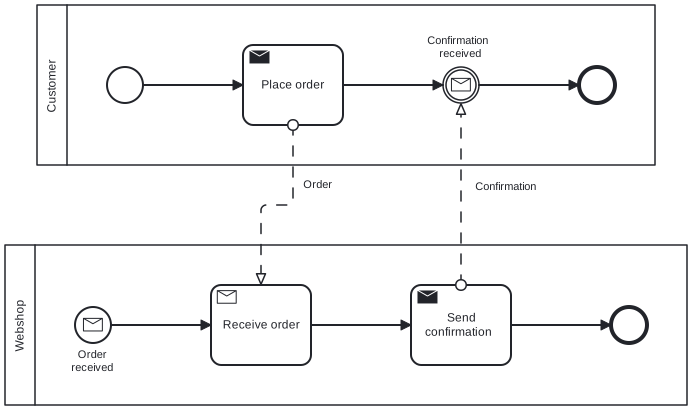
Diagram source
<?xml version="1.0" encoding="UTF-8"?><definitions xmlns="http://www.omg.org/spec/BPMN/20100524/MODEL" xmlns:bpmndi="http://www.omg.org/spec/BPMN/20100524/DI" xmlns:dc="http://www.omg.org/spec/DD/20100524/DC" xmlns:di="http://www.omg.org/spec/DD/20100524/DI" targetNamespace="http://example.org/bpmn"> <collaboration id="c1"> <participant id="pCustomer" name="Customer" processRef="customerProcess" /> <participant id="pShop" name="Webshop" processRef="shopProcess" /> <messageFlow id="m1" name="Order" sourceRef="placeOrder" targetRef="receiveOrder" /> <messageFlow id="m2" name="Confirmation" sourceRef="sendConfirm" targetRef="waitConfirm" /> </collaboration> <process id="customerProcess" isExecutable="false"> <startEvent id="cs"> <outgoing>cf1</outgoing> </startEvent> <sendTask id="placeOrder" name="Place order"> <incoming>cf1</incoming> <outgoing>cf2</outgoing> </sendTask> <intermediateCatchEvent id="waitConfirm" name="Confirmation received"> <incoming>cf2</incoming> <outgoing>cf3</outgoing> <messageEventDefinition /> </intermediateCatchEvent> <endEvent id="ce"> <incoming>cf3</incoming> </endEvent> <sequenceFlow id="cf1" sourceRef="cs" targetRef="placeOrder" /> <sequenceFlow id="cf2" sourceRef="placeOrder" targetRef="waitConfirm" /> <sequenceFlow id="cf3" sourceRef="waitConfirm" targetRef="ce" /> </process> <process id="shopProcess" isExecutable="false"> <startEvent id="ss" name="Order received"> <outgoing>sf1</outgoing> <messageEventDefinition /> </startEvent> <receiveTask id="receiveOrder" name="Receive order"> <incoming>sf1</incoming> <outgoing>sf2</outgoing> </receiveTask> <sendTask id="sendConfirm" name="Send confirmation"> <incoming>sf2</incoming> <outgoing>sf3</outgoing> </sendTask> <endEvent id="se"> <incoming>sf3</incoming> </endEvent> <sequenceFlow id="sf1" sourceRef="ss" targetRef="receiveOrder" /> <sequenceFlow id="sf2" sourceRef="receiveOrder" targetRef="sendConfirm" /> <sequenceFlow id="sf3" sourceRef="sendConfirm" targetRef="se" /> </process> <bpmndi:BPMNDiagram id="BPMNDiagram_c1"> <bpmndi:BPMNPlane id="BPMNPlane_c1" bpmnElement="c1"> <bpmndi:BPMNShape id="BPMNShape_pCustomer" bpmnElement="pCustomer" isHorizontal="true"> <dc:Bounds x="112" y="80" width="618" height="160" /> </bpmndi:BPMNShape> <bpmndi:BPMNShape id="BPMNShape_pShop" bpmnElement="pShop" isHorizontal="true"> <dc:Bounds x="80" y="320" width="682" height="160" /> </bpmndi:BPMNShape> <bpmndi:BPMNEdge id="BPMNEdge_m1" bpmnElement="m1"> <di:waypoint x="368" y="200" /> <di:waypoint x="368" y="280" /> <di:waypoint x="336" y="280" /> <di:waypoint x="336" y="360" /> <bpmndi:BPMNLabel> <dc:Bounds x="373" y="253" width="41" height="14" /> </bpmndi:BPMNLabel> </bpmndi:BPMNEdge> <bpmndi:BPMNEdge id="BPMNEdge_m2" bpmnElement="m2"> <di:waypoint x="536" y="360" /> <di:waypoint x="536" y="178" /> <bpmndi:BPMNLabel> <dc:Bounds x="541" y="255" width="86" height="28" /> </bpmndi:BPMNLabel> </bpmndi:BPMNEdge> <bpmndi:BPMNShape id="BPMNShape_cs" bpmnElement="cs"> <dc:Bounds x="182" y="142" width="36" height="36" /> </bpmndi:BPMNShape> <bpmndi:BPMNShape id="BPMNShape_placeOrder" bpmnElement="placeOrder"> <dc:Bounds x="318" y="120" width="100" height="80" /> </bpmndi:BPMNShape> <bpmndi:BPMNShape id="BPMNShape_waitConfirm" bpmnElement="waitConfirm"> <dc:Bounds x="518" y="142" width="36" height="36" /> <bpmndi:BPMNLabel> <dc:Bounds x="493" y="109" width="86" height="28" /> </bpmndi:BPMNLabel> </bpmndi:BPMNShape> <bpmndi:BPMNShape id="BPMNShape_ce" bpmnElement="ce"> <dc:Bounds x="654" y="142" width="36" height="36" /> </bpmndi:BPMNShape> <bpmndi:BPMNEdge id="BPMNEdge_cf1" bpmnElement="cf1"> <di:waypoint x="218" y="160" /> <di:waypoint x="318" y="160" /> </bpmndi:BPMNEdge> <bpmndi:BPMNEdge id="BPMNEdge_cf2" bpmnElement="cf2"> <di:waypoint x="418" y="160" /> <di:waypoint x="518" y="160" /> </bpmndi:BPMNEdge> <bpmndi:BPMNEdge id="BPMNEdge_cf3" bpmnElement="cf3"> <di:waypoint x="554" y="160" /> <di:waypoint x="654" y="160" /> </bpmndi:BPMNEdge> <bpmndi:BPMNShape id="BPMNShape_ss" bpmnElement="ss"> <dc:Bounds x="150" y="382" width="36" height="36" /> <bpmndi:BPMNLabel> <dc:Bounds x="138" y="423" width="60" height="28" /> </bpmndi:BPMNLabel> </bpmndi:BPMNShape> <bpmndi:BPMNShape id="BPMNShape_receiveOrder" bpmnElement="receiveOrder"> <dc:Bounds x="286" y="360" width="100" height="80" /> </bpmndi:BPMNShape> <bpmndi:BPMNShape id="BPMNShape_sendConfirm" bpmnElement="sendConfirm"> <dc:Bounds x="486" y="360" width="100" height="80" /> </bpmndi:BPMNShape> <bpmndi:BPMNShape id="BPMNShape_se" bpmnElement="se"> <dc:Bounds x="686" y="382" width="36" height="36" /> </bpmndi:BPMNShape> <bpmndi:BPMNEdge id="BPMNEdge_sf1" bpmnElement="sf1"> <di:waypoint x="186" y="400" /> <di:waypoint x="286" y="400" /> </bpmndi:BPMNEdge> <bpmndi:BPMNEdge id="BPMNEdge_sf2" bpmnElement="sf2"> <di:waypoint x="386" y="400" /> <di:waypoint x="486" y="400" /> </bpmndi:BPMNEdge> <bpmndi:BPMNEdge id="BPMNEdge_sf3" bpmnElement="sf3"> <di:waypoint x="586" y="400" /> <di:waypoint x="686" y="400" /> </bpmndi:BPMNEdge> </bpmndi:BPMNPlane> </bpmndi:BPMNDiagram></definitions>Checks
Section titled “Checks”- Each participating organization in a cross-company process appears as its own pool.
- Messages that cross organizational boundaries are drawn as message flows between pools, not inside one pool.
- Each message has exactly one sender and one recipient.
- Steps where a process waits for a partner’s answer use message events.
Related
Section titled “Related”- BPMN Collaboration Diagram
- BPMN Swimlane (Pool and Lane)
- BPMN Conversation Diagram
- BPMN Diagram Types
- Data Exchange between BPMN Processes
- BPMN Event
- Messaging
- BPMN Motivation
Sources
Section titled “Sources”- Business Process Model and Notation - Wikipedia — en.wikipedia.org, accessed 2026-11-08
- About the Business Process Model And Notation Specification Version 2.0 — omg.org, accessed 2026-11-08
- Message events | Camunda 8 Docs — docs.camunda.io, accessed 2026-11-09