BPMN Swimlane (Pool and Lane)
Explanation
Section titled “Explanation”A pool is a large box that holds a process. A lane is a strip inside a pool. Together they are called swimlanes.
Pool above lane. BPMN ranks the pool higher than its lanes. Lanes always exist inside a pool. A lane cannot stand alone.
What a lane means. BPMN does not say what a lane stands for. Many diagrams use lanes for people, but BPMN does not define that meaning. Your team must decide it and state it next to the diagram.
Pools and messages. BPMN assumes that messages go to participants outside your own pool. Separate pools therefore connect through message flows. A diagram with several pools linked this way is called a collaboration diagram (see BPMN Collaboration Diagram). Message flows are drawn dashed. They are allowed only between pools, not within a single pool.
Sequence flow stops at the pool edge. Sequence flow links steps inside a process. It cannot cross a pool boundary. To show a hand-off between pools, use a message flow instead.
Hiding a partner’s process. You can collapse a partner’s pool so its inner process is hidden. This keeps the diagram small. The cost is that you can no longer see how the message exchanges depend on each other.
Tool limit. In Camunda, pools and lanes exist only at the top level of a process or collaboration. They are not available inside subprocesses.
Example
Section titled “Example”An online shop diagram has two pools: “Customer” and “Shop”. The Shop pool has two lanes, “Sales” and “Warehouse”. Steps inside the Shop pool are linked by sequence flow, even when the flow moves from one lane to the other. The Customer sends an order to the Shop through a dashed message flow. The Shop later sends a confirmation back the same way. The team notes beside the diagram that lanes stand for departments, because BPMN does not decide this.
Trade-offs
Section titled “Trade-offs”Collapsing a partner’s pool keeps the diagram readable, but it hides how the message exchanges depend on each other. Keep the pool expanded when that order matters.
Because BPMN gives lanes no fixed meaning, two readers may interpret the same lanes differently unless the diagram states what they mean.
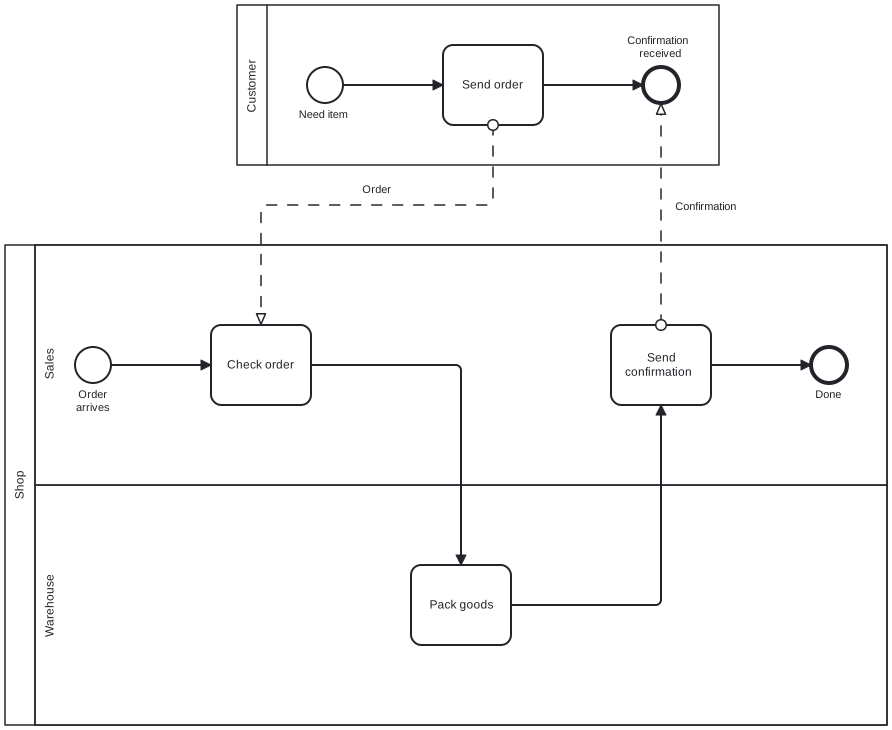
Diagram source
<?xml version="1.0" encoding="UTF-8"?><bpmn:definitions xmlns:bpmn="http://www.omg.org/spec/BPMN/20100524/MODEL" xmlns:bpmndi="http://www.omg.org/spec/BPMN/20100524/DI" xmlns:dc="http://www.omg.org/spec/DD/20100524/DC" xmlns:di="http://www.omg.org/spec/DD/20100524/DI" id="Defs_1" targetNamespace="http://example.org/bpmn"> <bpmn:collaboration id="Collab_1"> <bpmn:participant id="P_Customer" name="Customer" processRef="Proc_Customer" /> <bpmn:participant id="P_Shop" name="Shop" processRef="Proc_Shop" /> <bpmn:messageFlow id="MF_1" name="Order" sourceRef="T_Order" targetRef="T_Check" /> <bpmn:messageFlow id="MF_2" name="Confirmation" sourceRef="T_Confirm" targetRef="E_End_C" /> </bpmn:collaboration> <bpmn:process id="Proc_Customer" isExecutable="false"> <bpmn:startEvent id="S_C" name="Need item"> <bpmn:outgoing>SF_C1</bpmn:outgoing> </bpmn:startEvent> <bpmn:task id="T_Order" name="Send order"> <bpmn:incoming>SF_C1</bpmn:incoming> <bpmn:outgoing>SF_C2</bpmn:outgoing> </bpmn:task> <bpmn:endEvent id="E_End_C" name="Confirmation received"> <bpmn:incoming>SF_C2</bpmn:incoming> </bpmn:endEvent> <bpmn:sequenceFlow id="SF_C1" sourceRef="S_C" targetRef="T_Order" /> <bpmn:sequenceFlow id="SF_C2" sourceRef="T_Order" targetRef="E_End_C" /> </bpmn:process> <bpmn:process id="Proc_Shop" isExecutable="false"> <bpmn:laneSet id="LS_1"> <bpmn:lane id="L_Sales" name="Sales"> <bpmn:flowNodeRef>S_S</bpmn:flowNodeRef> <bpmn:flowNodeRef>T_Check</bpmn:flowNodeRef> <bpmn:flowNodeRef>T_Confirm</bpmn:flowNodeRef> <bpmn:flowNodeRef>E_S</bpmn:flowNodeRef> </bpmn:lane> <bpmn:lane id="L_Wh" name="Warehouse"> <bpmn:flowNodeRef>T_Pack</bpmn:flowNodeRef> </bpmn:lane> </bpmn:laneSet> <bpmn:startEvent id="S_S" name="Order arrives"> <bpmn:outgoing>SF_S1</bpmn:outgoing> </bpmn:startEvent> <bpmn:task id="T_Check" name="Check order"> <bpmn:incoming>SF_S1</bpmn:incoming> <bpmn:outgoing>SF_S2</bpmn:outgoing> </bpmn:task> <bpmn:task id="T_Pack" name="Pack goods"> <bpmn:incoming>SF_S2</bpmn:incoming> <bpmn:outgoing>SF_S3</bpmn:outgoing> </bpmn:task> <bpmn:task id="T_Confirm" name="Send confirmation"> <bpmn:incoming>SF_S3</bpmn:incoming> <bpmn:outgoing>SF_S4</bpmn:outgoing> </bpmn:task> <bpmn:endEvent id="E_S" name="Done"> <bpmn:incoming>SF_S4</bpmn:incoming> </bpmn:endEvent> <bpmn:sequenceFlow id="SF_S1" sourceRef="S_S" targetRef="T_Check" /> <bpmn:sequenceFlow id="SF_S2" sourceRef="T_Check" targetRef="T_Pack" /> <bpmn:sequenceFlow id="SF_S3" sourceRef="T_Pack" targetRef="T_Confirm" /> <bpmn:sequenceFlow id="SF_S4" sourceRef="T_Confirm" targetRef="E_S" /> </bpmn:process> <bpmndi:BPMNDiagram id="BPMNDiagram_Collab_1"> <bpmndi:BPMNPlane id="BPMNPlane_Collab_1" bpmnElement="Collab_1"> <bpmndi:BPMNShape id="BPMNShape_P_Customer" bpmnElement="P_Customer" isHorizontal="true"> <dc:Bounds x="312" y="80" width="482" height="160" /> </bpmndi:BPMNShape> <bpmndi:BPMNShape id="BPMNShape_P_Shop" bpmnElement="P_Shop" isHorizontal="true"> <dc:Bounds x="80" y="320" width="882" height="480" /> </bpmndi:BPMNShape> <bpmndi:BPMNEdge id="BPMNEdge_MF_1" bpmnElement="MF_1"> <di:waypoint x="568" y="200" /> <di:waypoint x="568" y="280" /> <di:waypoint x="336" y="280" /> <di:waypoint x="336" y="400" /> <bpmndi:BPMNLabel> <dc:Bounds x="432" y="258" width="41" height="14" /> </bpmndi:BPMNLabel> </bpmndi:BPMNEdge> <bpmndi:BPMNEdge id="BPMNEdge_MF_2" bpmnElement="MF_2"> <di:waypoint x="736" y="400" /> <di:waypoint x="736" y="178" /> <bpmndi:BPMNLabel> <dc:Bounds x="741" y="275" width="86" height="28" /> </bpmndi:BPMNLabel> </bpmndi:BPMNEdge> <bpmndi:BPMNShape id="BPMNShape_S_C" bpmnElement="S_C"> <dc:Bounds x="382" y="142" width="36" height="36" /> <bpmndi:BPMNLabel> <dc:Bounds x="366" y="183" width="69" height="14" /> </bpmndi:BPMNLabel> </bpmndi:BPMNShape> <bpmndi:BPMNShape id="BPMNShape_T_Order" bpmnElement="T_Order"> <dc:Bounds x="518" y="120" width="100" height="80" /> </bpmndi:BPMNShape> <bpmndi:BPMNShape id="BPMNShape_E_End_C" bpmnElement="E_End_C"> <dc:Bounds x="718" y="142" width="36" height="36" /> <bpmndi:BPMNLabel> <dc:Bounds x="693" y="109" width="86" height="28" /> </bpmndi:BPMNLabel> </bpmndi:BPMNShape> <bpmndi:BPMNEdge id="BPMNEdge_SF_C1" bpmnElement="SF_C1"> <di:waypoint x="418" y="160" /> <di:waypoint x="518" y="160" /> </bpmndi:BPMNEdge> <bpmndi:BPMNEdge id="BPMNEdge_SF_C2" bpmnElement="SF_C2"> <di:waypoint x="618" y="160" /> <di:waypoint x="718" y="160" /> </bpmndi:BPMNEdge> <bpmndi:BPMNShape id="BPMNShape_L_Sales" bpmnElement="L_Sales" isHorizontal="true"> <dc:Bounds x="110" y="320" width="852" height="240" /> </bpmndi:BPMNShape> <bpmndi:BPMNShape id="BPMNShape_L_Wh" bpmnElement="L_Wh" isHorizontal="true"> <dc:Bounds x="110" y="560" width="852" height="240" /> </bpmndi:BPMNShape> <bpmndi:BPMNShape id="BPMNShape_S_S" bpmnElement="S_S"> <dc:Bounds x="150" y="422" width="36" height="36" /> <bpmndi:BPMNLabel> <dc:Bounds x="142" y="463" width="53" height="28" /> </bpmndi:BPMNLabel> </bpmndi:BPMNShape> <bpmndi:BPMNShape id="BPMNShape_T_Check" bpmnElement="T_Check"> <dc:Bounds x="286" y="400" width="100" height="80" /> </bpmndi:BPMNShape> <bpmndi:BPMNShape id="BPMNShape_T_Pack" bpmnElement="T_Pack"> <dc:Bounds x="486" y="640" width="100" height="80" /> </bpmndi:BPMNShape> <bpmndi:BPMNShape id="BPMNShape_T_Confirm" bpmnElement="T_Confirm"> <dc:Bounds x="686" y="400" width="100" height="80" /> </bpmndi:BPMNShape> <bpmndi:BPMNShape id="BPMNShape_E_S" bpmnElement="E_S"> <dc:Bounds x="886" y="422" width="36" height="36" /> <bpmndi:BPMNLabel> <dc:Bounds x="887" y="463" width="34" height="14" /> </bpmndi:BPMNLabel> </bpmndi:BPMNShape> <bpmndi:BPMNEdge id="BPMNEdge_SF_S1" bpmnElement="SF_S1"> <di:waypoint x="186" y="440" /> <di:waypoint x="286" y="440" /> </bpmndi:BPMNEdge> <bpmndi:BPMNEdge id="BPMNEdge_SF_S2" bpmnElement="SF_S2"> <di:waypoint x="386" y="440" /> <di:waypoint x="536" y="440" /> <di:waypoint x="536" y="640" /> </bpmndi:BPMNEdge> <bpmndi:BPMNEdge id="BPMNEdge_SF_S3" bpmnElement="SF_S3"> <di:waypoint x="586" y="680" /> <di:waypoint x="736" y="680" /> <di:waypoint x="736" y="480" /> </bpmndi:BPMNEdge> <bpmndi:BPMNEdge id="BPMNEdge_SF_S4" bpmnElement="SF_S4"> <di:waypoint x="786" y="440" /> <di:waypoint x="886" y="440" /> </bpmndi:BPMNEdge> </bpmndi:BPMNPlane> </bpmndi:BPMNDiagram></bpmn:definitions>Checks
Section titled “Checks”- Communication between separate pools is shown with dashed message flows, not with sequence flow.
- No message flow connects two elements inside the same pool.
- Every lane sits inside a pool, and the diagram states what its lanes represent.
- Where a partner’s pool is collapsed, the document does not rely on it to show dependencies between message exchanges.
Related
Section titled “Related”- BPMN Collaboration Diagram
- BPMN Connecting Object
- BPMN Core Elements
- Data Exchange between BPMN Processes
- BPMN Conversation Diagram
- BPMN 2.0 Notation
- BPMN Layout Guideline
Sources
Section titled “Sources”- BPMN in practice - pools and lanes | BPM Tips — bpmtips.com, accessed 2026-11-09
- BPMN 2.0 Symbols - A complete guide with examples. | Camunda — camunda.com, accessed 2026-11-09
- BPMN primer | Camunda 8 Docs — docs.camunda.io, accessed 2026-11-08