BPMN Core Elements
Explanation
Section titled “Explanation”BPMN is a diagram notation for business processes. A diagram is built from a few kinds of elements.
Flow objects
- Events are things that happen. They are drawn as circles.
- Tasks are atomic units of work. Several tasks together produce a meaningful result.
- Gateways are diamonds. They route the process in more complex patterns than a plain line can. They control forking (splitting paths) and merging (joining paths).
Connecting objects
- Sequence flow is a solid line with an arrowhead. It sets the order in which steps happen.
- Message flow is a different kind of connection. It can never link elements inside the same pool.
Swimlanes
- A pool represents a major participant, typically a different organization.
- A lane splits the work inside a pool by function or role.
Data
- Data objects show which data an activity needs or produces.
Gateway types
- An exclusive (XOR) gateway picks exactly one outgoing path, based on data. As a join, it only passes the flow through. It does not wait for other paths.
- A parallel gateway as a split starts all outgoing paths at once. As a join, it waits until every incoming path has arrived.
- An inclusive (OR) gateway as a split takes every path whose condition is true.
Task and event types
- A user task is work done by a human.
- A service task is a work item of a specific type that runs automatically.
- A timer event is triggered by a date, a duration, or a cycle.
- A message event refers to a message and waits until that message arrives.
For more detail, see the articles BPMN 2.0 Notation, BPMN Gateway, and BPMN Swimlane (Pool and Lane).
Example
Section titled “Example”A small order process begins with an event, drawn as a circle. A user task follows: an employee reviews the order. Next comes an exclusive gateway. Based on data, such as whether the order is valid, it sends the flow down exactly one path. On the valid path, a service task sends a confirmation automatically. On the other path, a user task asks the customer for corrections. The paths then meet at a second exclusive gateway, which simply passes the flow on, and the process ends. Sequence flows, the solid arrows, set the order of all these steps.
Trade-offs
Section titled “Trade-offs”Gateway choice matters. A joining exclusive gateway does not wait for other paths. A joining parallel gateway waits for every incoming path. Pairing a split with the wrong kind of join changes how the process behaves. See BPMN Gateway Mismatch Antipatterns.
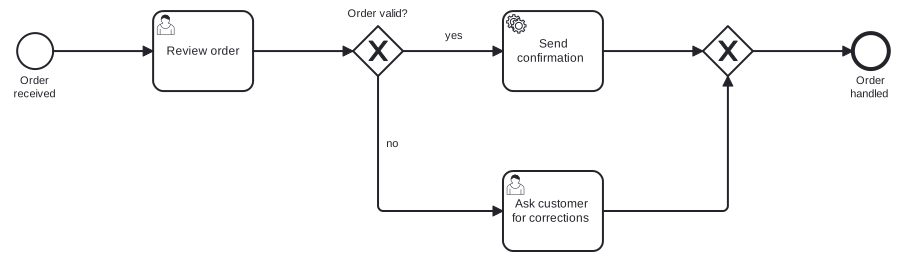
Diagram source
<?xml version="1.0" encoding="UTF-8"?><definitions xmlns="http://www.omg.org/spec/BPMN/20100524/MODEL" xmlns:bpmndi="http://www.omg.org/spec/BPMN/20100524/DI" xmlns:dc="http://www.omg.org/spec/DD/20100524/DC" xmlns:di="http://www.omg.org/spec/DD/20100524/DI" targetNamespace="http://example.org/bpmn"> <process id="order" isExecutable="false"> <startEvent id="start" name="Order received"> <outgoing>f1</outgoing> </startEvent> <userTask id="review" name="Review order"> <incoming>f1</incoming> <outgoing>f2</outgoing> </userTask> <exclusiveGateway id="split" name="Order valid?"> <incoming>f2</incoming> <outgoing>f3</outgoing> <outgoing>f4</outgoing> </exclusiveGateway> <serviceTask id="confirm" name="Send confirmation"> <incoming>f3</incoming> <outgoing>f5</outgoing> </serviceTask> <userTask id="fix" name="Ask customer for corrections"> <incoming>f4</incoming> <outgoing>f6</outgoing> </userTask> <exclusiveGateway id="join"> <incoming>f5</incoming> <incoming>f6</incoming> <outgoing>f7</outgoing> </exclusiveGateway> <endEvent id="end" name="Order handled"> <incoming>f7</incoming> </endEvent> <sequenceFlow id="f1" sourceRef="start" targetRef="review" /> <sequenceFlow id="f2" sourceRef="review" targetRef="split" /> <sequenceFlow id="f3" name="yes" sourceRef="split" targetRef="confirm" /> <sequenceFlow id="f4" name="no" sourceRef="split" targetRef="fix" /> <sequenceFlow id="f5" sourceRef="confirm" targetRef="join" /> <sequenceFlow id="f6" sourceRef="fix" targetRef="join" /> <sequenceFlow id="f7" sourceRef="join" targetRef="end" /> </process> <bpmndi:BPMNDiagram id="BPMNDiagram_order"> <bpmndi:BPMNPlane id="BPMNPlane_order" bpmnElement="order"> <bpmndi:BPMNShape id="BPMNShape_start" bpmnElement="start"> <dc:Bounds x="80" y="102" width="36" height="36" /> <bpmndi:BPMNLabel> <dc:Bounds x="68" y="143" width="60" height="28" /> </bpmndi:BPMNLabel> </bpmndi:BPMNShape> <bpmndi:BPMNShape id="BPMNShape_review" bpmnElement="review"> <dc:Bounds x="216" y="80" width="100" height="80" /> </bpmndi:BPMNShape> <bpmndi:BPMNShape id="BPMNShape_split" bpmnElement="split" isMarkerVisible="true"> <dc:Bounds x="416" y="95" width="50" height="50" /> <bpmndi:BPMNLabel> <dc:Bounds x="398" y="76" width="87" height="14" /> </bpmndi:BPMNLabel> </bpmndi:BPMNShape> <bpmndi:BPMNShape id="BPMNShape_confirm" bpmnElement="confirm"> <dc:Bounds x="566" y="80" width="100" height="80" /> </bpmndi:BPMNShape> <bpmndi:BPMNShape id="BPMNShape_fix" bpmnElement="fix"> <dc:Bounds x="566" y="240" width="100" height="80" /> </bpmndi:BPMNShape> <bpmndi:BPMNShape id="BPMNShape_join" bpmnElement="join" isMarkerVisible="true"> <dc:Bounds x="766" y="95" width="50" height="50" /> </bpmndi:BPMNShape> <bpmndi:BPMNShape id="BPMNShape_end" bpmnElement="end"> <dc:Bounds x="916" y="102" width="36" height="36" /> <bpmndi:BPMNLabel> <dc:Bounds x="908" y="143" width="53" height="28" /> </bpmndi:BPMNLabel> </bpmndi:BPMNShape> <bpmndi:BPMNEdge id="BPMNEdge_f1" bpmnElement="f1"> <di:waypoint x="116" y="120" /> <di:waypoint x="216" y="120" /> </bpmndi:BPMNEdge> <bpmndi:BPMNEdge id="BPMNEdge_f2" bpmnElement="f2"> <di:waypoint x="316" y="120" /> <di:waypoint x="416" y="120" /> </bpmndi:BPMNEdge> <bpmndi:BPMNEdge id="BPMNEdge_f3" bpmnElement="f3"> <di:waypoint x="466" y="120" /> <di:waypoint x="566" y="120" /> <bpmndi:BPMNLabel> <dc:Bounds x="504" y="98" width="25" height="14" /> </bpmndi:BPMNLabel> </bpmndi:BPMNEdge> <bpmndi:BPMNEdge id="BPMNEdge_f5" bpmnElement="f5"> <di:waypoint x="666" y="120" /> <di:waypoint x="766" y="120" /> </bpmndi:BPMNEdge> <bpmndi:BPMNEdge id="BPMNEdge_f7" bpmnElement="f7"> <di:waypoint x="816" y="120" /> <di:waypoint x="916" y="120" /> </bpmndi:BPMNEdge> <bpmndi:BPMNEdge id="BPMNEdge_f4" bpmnElement="f4"> <di:waypoint x="441" y="145" /> <di:waypoint x="441" y="280" /> <di:waypoint x="566" y="280" /> <bpmndi:BPMNLabel> <dc:Bounds x="447" y="206" width="18" height="14" /> </bpmndi:BPMNLabel> </bpmndi:BPMNEdge> <bpmndi:BPMNEdge id="BPMNEdge_f6" bpmnElement="f6"> <di:waypoint x="666" y="280" /> <di:waypoint x="791" y="280" /> <di:waypoint x="791" y="145" /> </bpmndi:BPMNEdge> </bpmndi:BPMNPlane> </bpmndi:BPMNDiagram></definitions>Checks
Section titled “Checks”- Message flow is used only between different pools, never between elements inside one pool.
- Each joining gateway matches its split: a parallel join where all paths must arrive, an exclusive join only where one path is taken.
- Pools represent participants such as different organizations, and lanes divide work inside a pool by role or function.
Related
Section titled “Related”- BPMN 2.0 Notation
- BPMN Gateway
- BPMN Event
- BPMN Activity
- BPMN Swimlane (Pool and Lane)
- BPMN Connecting Object
- BPMN Data Element
- BPMN Gateway Mismatch Antipatterns
Sources
Section titled “Sources”- BPMN primer | Camunda 8 Docs — docs.camunda.io, accessed 2026-11-08
- Business Process Model and Notation - Wikipedia — en.wikipedia.org, accessed 2026-11-08
- Exclusive gateway | Camunda 8 Docs — docs.camunda.io, accessed 2026-11-08
- Parallel gateway | Camunda 8 Docs — docs.camunda.io, accessed 2026-11-08
- Inclusive gateway | Camunda 8 Docs — docs.camunda.io, accessed 2026-11-08
- User tasks | Camunda 8 Docs — docs.camunda.io, accessed 2026-11-09
- Service tasks | Camunda 8 Docs — docs.camunda.io, accessed 2026-11-09
- Timer events | Camunda 8 Docs — docs.camunda.io, accessed 2026-11-08
- Message events | Camunda 8 Docs — docs.camunda.io, accessed 2026-11-09