BPMN Connecting Object
Explanation
Section titled “Explanation”BPMN (Business Process Model and Notation) diagrams use lines to link their elements. Each line type has its own look and its own job. These lines are called connecting objects.
Sequence flow. It is a solid line with an arrowhead. It shows the order in which activities are performed. Camunda describes it as the arrow that sets the order of execution between two elements. In iGrafx, a connector between two objects in the same pool is a sequence flow. A pool is a container for one participant’s process. See BPMN Swimlane (Pool and Lane).
Default sequence flow. This is a sequence flow with a slash on the line. The slash marks the default path.
Message flow. It is a dashed arrow between two pools. It runs from a source to a possible target in another pool. It shows communication between participants. A message flow can never connect activities or events inside the same pool. Camunda recommends separate pools joined by message flows to show how participants communicate.
Association. It is drawn as a dotted line.
A simple way to choose a line: look at where the two ends sit. Both ends in the same pool means sequence flow. Ends in different pools means message flow.
Layout tips. Camunda gives two tips:
- Avoid flows that cross each other.
- Avoid flows that span many pools or lanes.
Ordering the pools in a collaboration diagram can reduce message flows that cross pools.
Example
Section titled “Example”A customer pool and a shop pool sit one above the other. Inside the customer pool, solid arrows run from “Place order” to “Wait for delivery”. Inside the shop pool, a solid arrow runs from “Receive order” to “Ship goods”. A dashed arrow runs from “Place order” in the customer pool to “Receive order” in the shop pool. The solid arrows show order within each participant. The dashed arrow shows communication between them.
Trade-offs
Section titled “Trade-offs”Separate pools with message flows make communication between participants visible. Many message flows can cross pools and make the diagram hard to read. Reordering pools helps reduce this, but it cannot always remove every crossing.
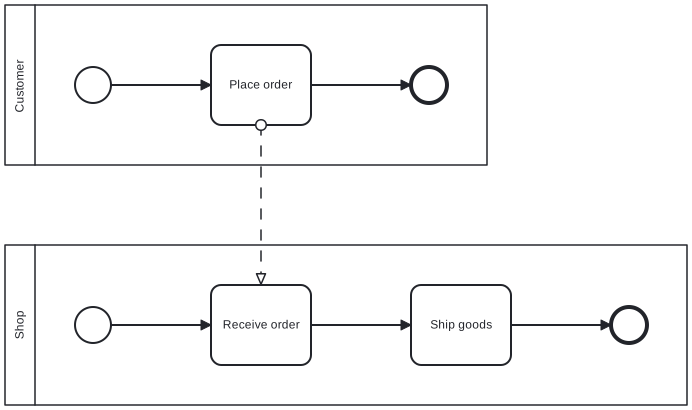
Diagram source
<?xml version="1.0" encoding="UTF-8"?><definitions xmlns="http://www.omg.org/spec/BPMN/20100524/MODEL" xmlns:bpmndi="http://www.omg.org/spec/BPMN/20100524/DI" xmlns:dc="http://www.omg.org/spec/DD/20100524/DC" xmlns:di="http://www.omg.org/spec/DD/20100524/DI" targetNamespace="http://example.org/bpmn"> <collaboration id="c1"> <participant id="pCustomer" name="Customer" processRef="customerProcess" /> <participant id="pShop" name="Shop" processRef="shopProcess" /> <messageFlow id="mf1" sourceRef="placeOrder" targetRef="receiveOrder" /> </collaboration> <process id="customerProcess" isExecutable="false"> <startEvent id="cs"> <outgoing>c1f</outgoing> </startEvent> <task id="placeOrder" name="Place order"> <incoming>c1f</incoming> <outgoing>c2f</outgoing> </task> <endEvent id="ce"> <incoming>c2f</incoming> </endEvent> <sequenceFlow id="c1f" sourceRef="cs" targetRef="placeOrder" /> <sequenceFlow id="c2f" sourceRef="placeOrder" targetRef="ce" /> </process> <process id="shopProcess" isExecutable="false"> <startEvent id="ss"> <outgoing>s1f</outgoing> </startEvent> <task id="receiveOrder" name="Receive order"> <incoming>s1f</incoming> <outgoing>s2f</outgoing> </task> <task id="ship" name="Ship goods"> <incoming>s2f</incoming> <outgoing>s3f</outgoing> </task> <endEvent id="se"> <incoming>s3f</incoming> </endEvent> <sequenceFlow id="s1f" sourceRef="ss" targetRef="receiveOrder" /> <sequenceFlow id="s2f" sourceRef="receiveOrder" targetRef="ship" /> <sequenceFlow id="s3f" sourceRef="ship" targetRef="se" /> </process> <bpmndi:BPMNDiagram id="BPMNDiagram_c1"> <bpmndi:BPMNPlane id="BPMNPlane_c1" bpmnElement="c1"> <bpmndi:BPMNShape id="BPMNShape_pCustomer" bpmnElement="pCustomer" isHorizontal="true"> <dc:Bounds x="80" y="80" width="482" height="160" /> </bpmndi:BPMNShape> <bpmndi:BPMNShape id="BPMNShape_pShop" bpmnElement="pShop" isHorizontal="true"> <dc:Bounds x="80" y="320" width="682" height="160" /> </bpmndi:BPMNShape> <bpmndi:BPMNEdge id="BPMNEdge_mf1" bpmnElement="mf1"> <di:waypoint x="336" y="200" /> <di:waypoint x="336" y="360" /> </bpmndi:BPMNEdge> <bpmndi:BPMNShape id="BPMNShape_cs" bpmnElement="cs"> <dc:Bounds x="150" y="142" width="36" height="36" /> </bpmndi:BPMNShape> <bpmndi:BPMNShape id="BPMNShape_placeOrder" bpmnElement="placeOrder"> <dc:Bounds x="286" y="120" width="100" height="80" /> </bpmndi:BPMNShape> <bpmndi:BPMNShape id="BPMNShape_ce" bpmnElement="ce"> <dc:Bounds x="486" y="142" width="36" height="36" /> </bpmndi:BPMNShape> <bpmndi:BPMNEdge id="BPMNEdge_c1f" bpmnElement="c1f"> <di:waypoint x="186" y="160" /> <di:waypoint x="286" y="160" /> </bpmndi:BPMNEdge> <bpmndi:BPMNEdge id="BPMNEdge_c2f" bpmnElement="c2f"> <di:waypoint x="386" y="160" /> <di:waypoint x="486" y="160" /> </bpmndi:BPMNEdge> <bpmndi:BPMNShape id="BPMNShape_ss" bpmnElement="ss"> <dc:Bounds x="150" y="382" width="36" height="36" /> </bpmndi:BPMNShape> <bpmndi:BPMNShape id="BPMNShape_receiveOrder" bpmnElement="receiveOrder"> <dc:Bounds x="286" y="360" width="100" height="80" /> </bpmndi:BPMNShape> <bpmndi:BPMNShape id="BPMNShape_ship" bpmnElement="ship"> <dc:Bounds x="486" y="360" width="100" height="80" /> </bpmndi:BPMNShape> <bpmndi:BPMNShape id="BPMNShape_se" bpmnElement="se"> <dc:Bounds x="686" y="382" width="36" height="36" /> </bpmndi:BPMNShape> <bpmndi:BPMNEdge id="BPMNEdge_s1f" bpmnElement="s1f"> <di:waypoint x="186" y="400" /> <di:waypoint x="286" y="400" /> </bpmndi:BPMNEdge> <bpmndi:BPMNEdge id="BPMNEdge_s2f" bpmnElement="s2f"> <di:waypoint x="386" y="400" /> <di:waypoint x="486" y="400" /> </bpmndi:BPMNEdge> <bpmndi:BPMNEdge id="BPMNEdge_s3f" bpmnElement="s3f"> <di:waypoint x="586" y="400" /> <di:waypoint x="686" y="400" /> </bpmndi:BPMNEdge> </bpmndi:BPMNPlane> </bpmndi:BPMNDiagram></definitions>Checks
Section titled “Checks”- Connectors between two elements in the same pool are sequence flows, not message flows.
- Communication between participants is shown as message flow between separate pools.
- The default path from a decision point is marked with a slash on its sequence flow.
- The diagram avoids crossing flows and flows spanning many pools or lanes.
Related
Section titled “Related”- BPMN Swimlane (Pool and Lane)
- BPMN Collaboration Diagram
- BPMN Core Elements
- BPMN Layout Guideline
- BPMN Modeling Guidelines
- BPMN Data Element
- BPMN Artifacts (Group and Text Annotation)
- BPMN Gateway
Sources
Section titled “Sources”- Business Process Model and Notation - Wikipedia — en.wikipedia.org, accessed 2026-11-08
- Connector Lines in BPMN Diagrams Reference — client.igrafx.com, accessed 2026-11-09
- Creating readable process models | Camunda 8 Docs — docs.camunda.io, accessed 2026-11-09
- BPMN primer | Camunda 8 Docs — docs.camunda.io, accessed 2026-11-08