BPMN Core Elements
Explanation
Section titled “Explanation”BPMN (Business Process Model and Notation) is an OMG specification. It is also ratified as ISO 19510.
Flow objects. Events, activities and gateways are the main describing elements of BPMN. Most diagrams are built from these three.
- Tasks are the atomic units of work. Combined, they produce a meaningful result. See BPMN Activity for more.
- Sequence flow is the arrow that sets the order in which steps happen.
- Events are things that happen. A process can catch an event, meaning it reacts to it. It can also throw an event, meaning it emits it. A timer event fires from a defined timer. It can start a process or sit in the middle of one. A link event connects two parts of one diagram, matched by link name.
- Gateways route flow in patterns more complex than a plain arrow.
Gateway types.
- Exclusive (XOR): picks exactly one outgoing path, based on data. It can have a default path.
- Parallel: takes all outgoing paths when splitting. When joining, it waits for all incoming paths.
- Inclusive (OR): takes every outgoing path whose condition is true.
- Event-based: waits for the first of several catch events, such as a timer, message or signal. It follows only that event’s path.
Data and organization. Data objects show which data an activity needs or produces. Swim lanes (pools and lanes) organize activities visually.
Tokens. A token is created when the process starts. It moves forward with each completed step. It is consumed at the end, which ends that process instance.
Example
Section titled “Example”Picture a simple order process. A start event creates a token. The task “Check order” runs. An exclusive gateway then sends the token down one path: “Approve order” or “Reject order”. The approve path continues to an end event. The token is consumed there, and the instance ends.
Trade-offs
Section titled “Trade-offs”The facts here describe what the elements do. They do not cover costs or limits. Pick the gateway type that matches the routing you mean. An exclusive gateway takes one path. A parallel gateway takes all paths. An inclusive gateway takes every path whose condition is true.
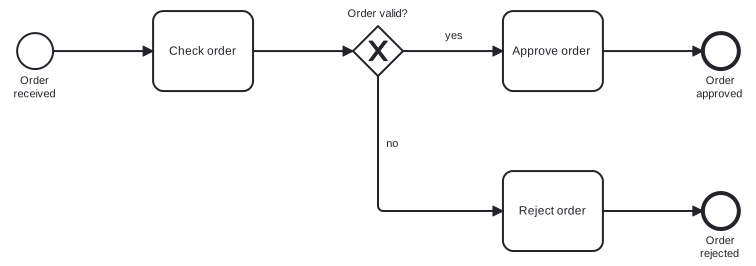
Diagram source
<?xml version="1.0" encoding="UTF-8"?><definitions xmlns="http://www.omg.org/spec/BPMN/20100524/MODEL" xmlns:bpmndi="http://www.omg.org/spec/BPMN/20100524/DI" xmlns:dc="http://www.omg.org/spec/DD/20100524/DC" xmlns:di="http://www.omg.org/spec/DD/20100524/DI" targetNamespace="http://example.com/bpmn"> <process id="order" isExecutable="false"> <startEvent id="start" name="Order received"> <outgoing>f1</outgoing> </startEvent> <task id="check" name="Check order"> <incoming>f1</incoming> <outgoing>f2</outgoing> </task> <exclusiveGateway id="gw" name="Order valid?"> <incoming>f2</incoming> <outgoing>f3</outgoing> <outgoing>f4</outgoing> </exclusiveGateway> <task id="approve" name="Approve order"> <incoming>f3</incoming> <outgoing>f5</outgoing> </task> <task id="reject" name="Reject order"> <incoming>f4</incoming> <outgoing>f6</outgoing> </task> <endEvent id="endOk" name="Order approved"> <incoming>f5</incoming> </endEvent> <endEvent id="endNo" name="Order rejected"> <incoming>f6</incoming> </endEvent> <sequenceFlow id="f1" sourceRef="start" targetRef="check" /> <sequenceFlow id="f2" sourceRef="check" targetRef="gw" /> <sequenceFlow id="f3" name="yes" sourceRef="gw" targetRef="approve" /> <sequenceFlow id="f4" name="no" sourceRef="gw" targetRef="reject" /> <sequenceFlow id="f5" sourceRef="approve" targetRef="endOk" /> <sequenceFlow id="f6" sourceRef="reject" targetRef="endNo" /> </process> <bpmndi:BPMNDiagram id="BPMNDiagram_order"> <bpmndi:BPMNPlane id="BPMNPlane_order" bpmnElement="order"> <bpmndi:BPMNShape id="BPMNShape_start" bpmnElement="start"> <dc:Bounds x="80" y="102" width="36" height="36" /> <bpmndi:BPMNLabel> <dc:Bounds x="68" y="143" width="60" height="28" /> </bpmndi:BPMNLabel> </bpmndi:BPMNShape> <bpmndi:BPMNShape id="BPMNShape_check" bpmnElement="check"> <dc:Bounds x="216" y="80" width="100" height="80" /> </bpmndi:BPMNShape> <bpmndi:BPMNShape id="BPMNShape_gw" bpmnElement="gw" isMarkerVisible="true"> <dc:Bounds x="416" y="95" width="50" height="50" /> <bpmndi:BPMNLabel> <dc:Bounds x="398" y="76" width="87" height="14" /> </bpmndi:BPMNLabel> </bpmndi:BPMNShape> <bpmndi:BPMNShape id="BPMNShape_approve" bpmnElement="approve"> <dc:Bounds x="566" y="80" width="100" height="80" /> </bpmndi:BPMNShape> <bpmndi:BPMNShape id="BPMNShape_reject" bpmnElement="reject"> <dc:Bounds x="566" y="240" width="100" height="80" /> </bpmndi:BPMNShape> <bpmndi:BPMNShape id="BPMNShape_endOk" bpmnElement="endOk"> <dc:Bounds x="766" y="102" width="36" height="36" /> <bpmndi:BPMNLabel> <dc:Bounds x="754" y="143" width="60" height="28" /> </bpmndi:BPMNLabel> </bpmndi:BPMNShape> <bpmndi:BPMNShape id="BPMNShape_endNo" bpmnElement="endNo"> <dc:Bounds x="766" y="262" width="36" height="36" /> <bpmndi:BPMNLabel> <dc:Bounds x="754" y="303" width="60" height="28" /> </bpmndi:BPMNLabel> </bpmndi:BPMNShape> <bpmndi:BPMNEdge id="BPMNEdge_f1" bpmnElement="f1"> <di:waypoint x="116" y="120" /> <di:waypoint x="216" y="120" /> </bpmndi:BPMNEdge> <bpmndi:BPMNEdge id="BPMNEdge_f2" bpmnElement="f2"> <di:waypoint x="316" y="120" /> <di:waypoint x="416" y="120" /> </bpmndi:BPMNEdge> <bpmndi:BPMNEdge id="BPMNEdge_f3" bpmnElement="f3"> <di:waypoint x="466" y="120" /> <di:waypoint x="566" y="120" /> <bpmndi:BPMNLabel> <dc:Bounds x="504" y="98" width="25" height="14" /> </bpmndi:BPMNLabel> </bpmndi:BPMNEdge> <bpmndi:BPMNEdge id="BPMNEdge_f5" bpmnElement="f5"> <di:waypoint x="666" y="120" /> <di:waypoint x="766" y="120" /> </bpmndi:BPMNEdge> <bpmndi:BPMNEdge id="BPMNEdge_f4" bpmnElement="f4"> <di:waypoint x="441" y="145" /> <di:waypoint x="441" y="280" /> <di:waypoint x="566" y="280" /> <bpmndi:BPMNLabel> <dc:Bounds x="447" y="206" width="18" height="14" /> </bpmndi:BPMNLabel> </bpmndi:BPMNEdge> <bpmndi:BPMNEdge id="BPMNEdge_f6" bpmnElement="f6"> <di:waypoint x="666" y="280" /> <di:waypoint x="766" y="280" /> </bpmndi:BPMNEdge> </bpmndi:BPMNPlane> </bpmndi:BPMNDiagram></definitions>Checks
Section titled “Checks”- Every process diagram uses sequence flow to show the order of steps.
- Each gateway type matches its routing intent: exclusive picks one path, parallel takes all, inclusive takes all whose condition is true.
- Parallel splits are closed by a parallel join that waits for all incoming flows.
- Data objects show which data activities need or produce.
- Pools and lanes organize activities by responsibility.
Related
Section titled “Related”- BPMN Activity
- BPMN Gateway
- BPMN Event
- BPMN Connecting Object
- BPMN Data Element
- BPMN Swimlane (Pool and Lane)
- Link Event
- Event-Based Gateway
Sources
Section titled “Sources”- BPMN primer | Camunda 8 Docs — docs.camunda.io, accessed 2026-11-08
- Business Process Model and Notation - Wikipedia — en.wikipedia.org, accessed 2026-11-08
- Exclusive gateway | Camunda 8 Docs — docs.camunda.io, accessed 2026-11-08
- Parallel gateway | Camunda 8 Docs — docs.camunda.io, accessed 2026-11-08
- Inclusive gateway | Camunda 8 Docs — docs.camunda.io, accessed 2026-11-08
- Event-based gateway | Camunda 8 Docs — docs.camunda.io, accessed 2026-11-08
- Timer events | Camunda 8 Docs — docs.camunda.io, accessed 2026-11-08
- Link events | Camunda 8 Docs — docs.camunda.io, accessed 2026-11-08