Degrees of BPM Maturity
Explanation
Section titled “Explanation”Automation is not all or nothing. Task automation means technology performs a task without human intervention. Process automation combines orchestration (coordinating the steps of a process) with task automation. The degree of automation can vary from process to process.
The far end: straight-through processing. Straight-through processing (STP) means a transaction is completed from start to finish without human intervention. Teams measure it as a rate: the share of the process that is automated. Partial automation still pays off, so a process does not need full STP to bring benefits.
Humans in the loop. Between manual work and STP, people can stay in specific steps. An AI agent can handle ambiguous situations that fixed rules cannot cover. If its result has low confidence, the process routes it to a human for review before it continues.
Enablers: RPA and AI agents.
- Robotic process automation (RPA) began as screen-scraping of graphical user interfaces. That origin is why it works as a bridge to legacy systems.
- Keep the legacy system in the process today. Replace the RPA tasks with APIs or agents when you are ready.
- AI agents need governance. An orchestration solution should enforce guardrails around them, so people can monitor and audit them inside the process.
Architectural implications. RPA bots can run as ordinary process steps. They then share error handling, retries, and audit with every other step. This keeps integration and exception handling in one place, even when you later swap a bot for an API or an agent.
Maturity models are a different lens. The Rosemann/de Bruin BPM maturity model has six core factors: strategic alignment, governance, method, IT, people, and culture. It was built through Delphi studies. So it describes the organization as a whole, while degrees of automation describe how far a single process is automated.
Example
Section titled “Example”An insurer handles address-change requests. At first, a clerk reads each request and updates a legacy system by hand. The team adds an RPA bot that types the update into the legacy screen, run as a normal step in the process. An AI agent then reads free-text requests. When its confidence is low, the request goes to a clerk. Later the team replaces the bot with an API call. Most requests now finish with no human step, so the share completed straight through rises.
Trade-offs
Section titled “Trade-offs”Each step toward more automation removes human effort, but it needs more support. You must govern AI agents with guardrails, monitoring, and audit. RPA keeps legacy systems working, but it is a temporary bridge that you plan to replace. Full STP is not required: partial automation still has value, so choose the degree per process. The facts here do not cover how to weigh cost, volume, or compliance, so decide that case by case.
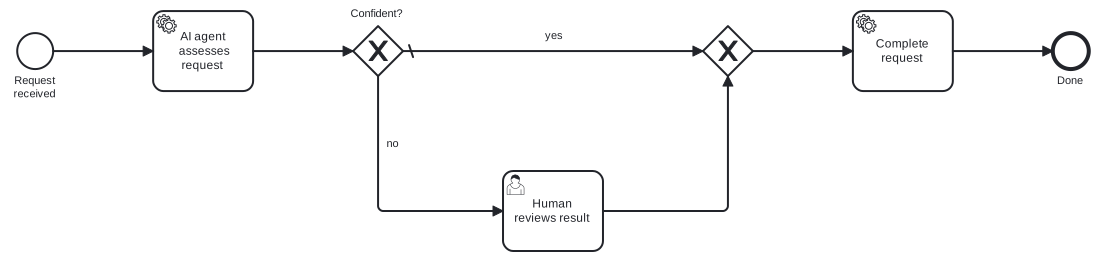
Diagram source
<?xml version="1.0" encoding="UTF-8"?><definitions xmlns="http://www.omg.org/spec/BPMN/20100524/MODEL" xmlns:bpmndi="http://www.omg.org/spec/BPMN/20100524/DI" xmlns:dc="http://www.omg.org/spec/DD/20100524/DC" xmlns:di="http://www.omg.org/spec/DD/20100524/DI" targetNamespace="http://example.com/bpmn"> <process id="p1" isExecutable="false"> <startEvent id="s" name="Request received"> <outgoing>f1</outgoing> </startEvent> <serviceTask id="t1" name="AI agent assesses request"> <incoming>f1</incoming> <outgoing>f2</outgoing> </serviceTask> <exclusiveGateway id="g1" name="Confident?" default="f_yes"> <incoming>f2</incoming> <outgoing>f_yes</outgoing> <outgoing>f_no</outgoing> </exclusiveGateway> <userTask id="t2" name="Human reviews result"> <incoming>f_no</incoming> <outgoing>f3</outgoing> </userTask> <exclusiveGateway id="g2"> <incoming>f_yes</incoming> <incoming>f3</incoming> <outgoing>f4</outgoing> </exclusiveGateway> <serviceTask id="t3" name="Complete request"> <incoming>f4</incoming> <outgoing>f5</outgoing> </serviceTask> <endEvent id="e" name="Done"> <incoming>f5</incoming> </endEvent> <sequenceFlow id="f1" sourceRef="s" targetRef="t1" /> <sequenceFlow id="f2" sourceRef="t1" targetRef="g1" /> <sequenceFlow id="f_yes" name="yes" sourceRef="g1" targetRef="g2" /> <sequenceFlow id="f_no" name="no" sourceRef="g1" targetRef="t2" /> <sequenceFlow id="f3" sourceRef="t2" targetRef="g2" /> <sequenceFlow id="f4" sourceRef="g2" targetRef="t3" /> <sequenceFlow id="f5" sourceRef="t3" targetRef="e" /> </process> <bpmndi:BPMNDiagram id="BPMNDiagram_p1"> <bpmndi:BPMNPlane id="BPMNPlane_p1" bpmnElement="p1"> <bpmndi:BPMNShape id="BPMNShape_s" bpmnElement="s"> <dc:Bounds x="80" y="102" width="36" height="36" /> <bpmndi:BPMNLabel> <dc:Bounds x="68" y="143" width="60" height="28" /> </bpmndi:BPMNLabel> </bpmndi:BPMNShape> <bpmndi:BPMNShape id="BPMNShape_t1" bpmnElement="t1"> <dc:Bounds x="216" y="80" width="100" height="80" /> </bpmndi:BPMNShape> <bpmndi:BPMNShape id="BPMNShape_g1" bpmnElement="g1" isMarkerVisible="true"> <dc:Bounds x="416" y="95" width="50" height="50" /> <bpmndi:BPMNLabel> <dc:Bounds x="403" y="76" width="76" height="14" /> </bpmndi:BPMNLabel> </bpmndi:BPMNShape> <bpmndi:BPMNShape id="BPMNShape_t2" bpmnElement="t2"> <dc:Bounds x="566" y="240" width="100" height="80" /> </bpmndi:BPMNShape> <bpmndi:BPMNShape id="BPMNShape_g2" bpmnElement="g2" isMarkerVisible="true"> <dc:Bounds x="766" y="95" width="50" height="50" /> </bpmndi:BPMNShape> <bpmndi:BPMNShape id="BPMNShape_t3" bpmnElement="t3"> <dc:Bounds x="916" y="80" width="100" height="80" /> </bpmndi:BPMNShape> <bpmndi:BPMNShape id="BPMNShape_e" bpmnElement="e"> <dc:Bounds x="1116" y="102" width="36" height="36" /> <bpmndi:BPMNLabel> <dc:Bounds x="1117" y="143" width="34" height="14" /> </bpmndi:BPMNLabel> </bpmndi:BPMNShape> <bpmndi:BPMNEdge id="BPMNEdge_f1" bpmnElement="f1"> <di:waypoint x="116" y="120" /> <di:waypoint x="216" y="120" /> </bpmndi:BPMNEdge> <bpmndi:BPMNEdge id="BPMNEdge_f2" bpmnElement="f2"> <di:waypoint x="316" y="120" /> <di:waypoint x="416" y="120" /> </bpmndi:BPMNEdge> <bpmndi:BPMNEdge id="BPMNEdge_f_yes" bpmnElement="f_yes"> <di:waypoint x="466" y="120" /> <di:waypoint x="766" y="120" /> <bpmndi:BPMNLabel> <dc:Bounds x="604" y="98" width="25" height="14" /> </bpmndi:BPMNLabel> </bpmndi:BPMNEdge> <bpmndi:BPMNEdge id="BPMNEdge_f4" bpmnElement="f4"> <di:waypoint x="816" y="120" /> <di:waypoint x="916" y="120" /> </bpmndi:BPMNEdge> <bpmndi:BPMNEdge id="BPMNEdge_f5" bpmnElement="f5"> <di:waypoint x="1016" y="120" /> <di:waypoint x="1116" y="120" /> </bpmndi:BPMNEdge> <bpmndi:BPMNEdge id="BPMNEdge_f_no" bpmnElement="f_no"> <di:waypoint x="441" y="145" /> <di:waypoint x="441" y="280" /> <di:waypoint x="566" y="280" /> <bpmndi:BPMNLabel> <dc:Bounds x="447" y="206" width="18" height="14" /> </bpmndi:BPMNLabel> </bpmndi:BPMNEdge> <bpmndi:BPMNEdge id="BPMNEdge_f3" bpmnElement="f3"> <di:waypoint x="666" y="280" /> <di:waypoint x="791" y="280" /> <di:waypoint x="791" y="145" /> </bpmndi:BPMNEdge> </bpmndi:BPMNPlane> </bpmndi:BPMNDiagram></definitions>Checks
Section titled “Checks”- The document states, for each process, how far it is automated, and whether partial automation is accepted.
- Where RPA bridges a legacy system, the document plans its later replacement by APIs or agents.
- RPA bots run as normal process steps with shared error handling, retries, and audit.
- AI agents run inside an orchestrated process with guardrails, monitoring, and audit.
- Low-confidence agent results route to human review before the process continues.
Related
Section titled “Related”- Process Automation Magnifies Efficiency
- Waves of Business Process Management
- BPM Life Cycle
- Workflow Pattern
- Process Manager
- Exception Handling Tactic
- BPMN Task Marker and Task Type
- Levels of Process Modeling
Sources
Section titled “Sources”- Process Orchestration: Guide to Benefits & Software | Camunda — camunda.com, accessed 2026-11-09
- What Is Straight-Through Processing? | IBM — ibm.com, accessed 2026-11-09
- Process Building Blocks: Decisions, RPA & IDP | Camunda — camunda.com, accessed 2026-11-09
- “Towards a Business Process Managment Maturity Model” by Michael Rosemann and Tonia de Bruin — aisel.aisnet.org, accessed 2026-11-09