Transfer Object Pattern as Package Template
Explanation
Section titled “Explanation”The pattern. A Transfer Object (also called a Data Transfer Object, or DTO) is an object that carries data between processes. Its purpose is to cut the number of method calls. On the server side, an assembler usually copies data between the DTO and the domain objects.
Why remote calls matter. DTOs exist because remote calls are expensive. Bundling data into one object lets one call do the work of many. In purely local code, this bundling is not needed. It can even do harm. For local designs, the advice is to start with a Service Layer whose method signatures use domain objects, not DTOs.
The template idea. UML lets you define a template: an element with open slots, called formal parameters. A package can be such an element. You describe the pattern once and leave the slots open. Each concrete package then fills the slots with real elements. See the Package Diagram article for the basics of packages.
Binding. A template binding is a relationship between a templateable element (such as a package) and a template. It substitutes actual parameters for the formal ones.
Notation.
- The binding is a dashed arrow. Its tail sits on the bound element, and its head points at the template.
- The «bind» keyword labels the arrow.
- The substitutions appear on the arrow as a comma-separated list.
- Other UML relationships also use dashed arrows, so read the keyword before you decide what an arrow means.
Where it helps. A template package documents a reusable pattern once. Many concrete packages can point to it, so you do not redraw the pattern each time.
Example
Section titled “Example”A team documents its Transfer Object pattern once, as a template package with two open slots: one for a key type and one for a data type. Two concrete packages, “Customer Access” and “Order Access”, each draw a dashed «bind» arrow to the template. Each arrow lists its own substitutions, separated by commas.
Trade-offs
Section titled “Trade-offs”- A template states the pattern once, and each binding stays short. Readers must know the binding notation, though, and the dashed arrow looks like other UML arrows.
- The template only describes the pattern. It does not tell you whether you need it. Transfer Objects pay off for expensive remote calls. In local contexts they can be harmful, so do not bind the template there by default.
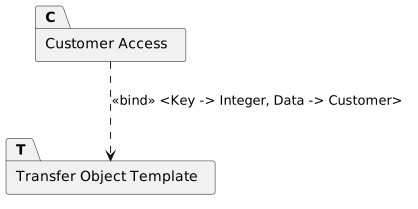
Diagram source
@startumlpackage "Transfer Object Template" as Tpackage "Customer Access" as CC ..> T : <<bind>> <Key -> Integer, Data -> Customer>@endumlChecks
Section titled “Checks”- Each template binding is drawn as a dashed arrow from the bound element to the template, with the «bind» keyword.
- The parameter substitutions are listed on the binding arrow, separated by commas.
- Transfer Objects appear only where calls cross process boundaries and are expensive; local designs use domain objects directly.
- Where Transfer Objects are used, the document names the assembler that maps between them and the domain objects.
Related
Section titled “Related”- Package Diagram
- UML Class Diagram
- Package Relationships (Import, Access, Merge, Use)
- Remote Procedure Call
- Architectural Pattern vs. Design Pattern
- Domain Model
- UML Class Diagram Relationship
- UML Modeling Best Practice
Sources
Section titled “Sources”- Data Transfer Object — martinfowler.com, accessed 2026-11-09
- — site.uottawa.ca, accessed 2026-11-09
- Generics in UML — eclipse.org, accessed 2026-11-09
- Local D T O — martinfowler.com, accessed 2026-11-09