C4 Model
Explanation
Section titled “Explanation”C4 is a developer-friendly approach to drawing software architecture. It combines two hierarchies: a set of abstractions and a matching set of diagrams.
The four abstractions are software systems, containers, components, and code. The four diagrams are system context, containers, components, and code. The name “C4” comes from these four core diagrams, which show static structure.
Containers. A container is a runtime boundary. It surrounds code that is being executed or data that is being stored. Typical examples are web apps, mobile apps, and databases. The word does not necessarily mean Docker. It was chosen because it says nothing about how the thing physically runs.
Components. A component is a group of related functionality behind a well-defined interface. One or more code elements implement it. Code elements include classes, interfaces, objects, and functions. The container, not the component, is the deployable unit.
Zoom levels. Each level of zoom tells a different story to a different audience. The context and container diagrams often suffice.
Supplementary diagrams. C4 adds three supporting diagrams: system landscape, dynamic, and deployment.
Link to arc42. The arc42 template has twelve sections. They include Context and Scope, Building Block, Runtime, and Deployment views. See the articles “arc42 Architecture Documentation Template” and “arc42 Context and Scope”.
Each level has its own article: “System Context Diagram”, “Container Diagram (C4 Level 2)”, “C4 Component Diagram”, and “C4 Level 4: Code Diagram”.
Example
Section titled “Example”A team builds an online shop. The context diagram shows the shop as one box, with customers and a payment provider around it. The container diagram opens that box. It shows a web app, a mobile app, and a database. The component diagram opens the web app. It shows groups of related functionality, such as ordering and catalog. The code diagram shows the classes behind one of those groups.
Trade-offs
Section titled “Trade-offs”Every extra level is another diagram to keep current. The facts note that context and container diagrams often suffice, so a team can stop zooming earlier. The word “container” can mislead readers who associate it with Docker.
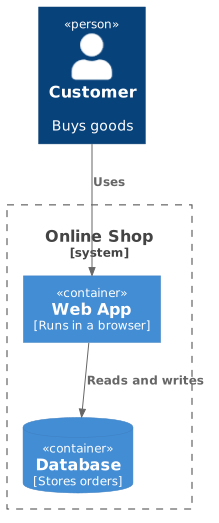
Diagram source
@startuml!include <C4/C4_Container>Person(customer, "Customer", "Buys goods")System_Boundary(shop, "Online Shop") { Container(web, "Web App", "Runs in a browser") ContainerDb(db, "Database", "Stores orders")}Rel(customer, web, "Uses")Rel(web, db, "Reads and writes")@endumlChecks
Section titled “Checks”- Diagrams are organized by zoom level (context, containers, components, code), and each level zooms into the previous one.
- Each container shown is a separately executing or data-storing unit, such as a web app or database, not assumed to be Docker.
- Each component is described as related functionality behind a well-defined interface.
- The chosen levels of detail fit the audience; context and container diagrams are present.
Related
Section titled “Related”- System Context Diagram
- Container Diagram (C4 Level 2)
- C4 Component Diagram
- C4 Level 4: Code Diagram
- arc42 Architecture Documentation Template
- arc42 Context and Scope
- Diagrams as Code
- Unified Modeling Language (UML)
Sources
Section titled “Sources”- Home | C4 model — c4model.com, accessed 2026-11-09
- Diagrams | C4 model — c4model.com, accessed 2026-11-09
- Container | C4 model — c4model.com, accessed 2026-11-09
- Component | C4 model — c4model.com, accessed 2026-11-09
- Abstractions | C4 model — c4model.com, accessed 2026-11-09
- arc42 Template Overview - arc42 — arc42.org, accessed 2026-11-09