BPMN Ad Hoc Sub-Process
Explanation
Section titled “Explanation”Most process models fix the order of steps in advance. Some work does not fit that mold. A BPMN ad hoc sub-process (see BPMN Activity) is a container for such work. It holds a set of activities, and the order is left open.
What “open” means
- Each inner element can run several times, in any order, or not at all.
- By default, no sequence flows connect the inner activities.
- Which activities run, in what order, and how often is decided at runtime, not at design time.
- The inner elements are not connected to a start or end event. An ad hoc sub-process must not contain them.
Who decides
Open sequencing does not mean no control. In Camunda’s BPMN, the engine can decide, based on an expression in the model. A job worker, which is code that handles work on behalf of the engine, can also decide. Camunda can run an ad hoc sub-process internally in its engine Zeebe, or through a job worker.
When it ends
If the model defines no completion condition, the sub-process finishes after all activated elements are done.
Alternative for free-form work
CMMN is an OMG standard for cases whose activities may happen in an unpredictable order. OMG states that combining BPMN and CMMN covers a much broader range of work methods. That supports using CMMN next to BPMN for free-form work.
Typical use
Camunda proposes ad hoc sub-processes for agent-driven or flexible work. In that work, people add or remove tasks as circumstances change.
Example
Section titled “Example”A support team handles a complaint. The ad hoc sub-process holds “call the customer”, “check the order history”, “request a refund” and “escalate to a manager”. The case worker picks what the situation needs. They may call the customer twice and skip the refund. When all activated tasks are done, the sub-process ends.
Trade-offs
Section titled “Trade-offs”Benefits: the model fits work where the steps cannot be known in advance. People or software can add or remove tasks as circumstances change.
Costs: the model no longer shows the order of work, because that is decided at runtime. Readers learn less about the process from the diagram alone. Control moves to an engine expression or a job worker. For work that is mostly free-form, a CMMN case model may fit better, according to OMG’s view that BPMN and CMMN complement each other.
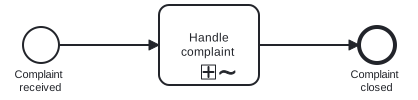
Diagram source
<?xml version="1.0" encoding="UTF-8"?><bpmn:definitions xmlns:bpmn="http://www.omg.org/spec/BPMN/20100524/MODEL" xmlns:bpmndi="http://www.omg.org/spec/BPMN/20100524/DI" xmlns:dc="http://www.omg.org/spec/DD/20100524/DC" xmlns:di="http://www.omg.org/spec/DD/20100524/DI" id="d1" targetNamespace="http://example.com/bpmn"> <bpmn:process id="p1" isExecutable="false"> <bpmn:startEvent id="s" name="Complaint received"> <bpmn:outgoing>f1</bpmn:outgoing> </bpmn:startEvent> <bpmn:sequenceFlow id="f1" sourceRef="s" targetRef="adhoc" /> <bpmn:adHocSubProcess id="adhoc" name="Handle complaint"> <bpmn:incoming>f1</bpmn:incoming> <bpmn:outgoing>f2</bpmn:outgoing> <bpmn:task id="t1" name="Call customer" /> <bpmn:task id="t2" name="Check order history" /> <bpmn:task id="t3" name="Request refund" /> </bpmn:adHocSubProcess> <bpmn:sequenceFlow id="f2" sourceRef="adhoc" targetRef="e" /> <bpmn:endEvent id="e" name="Complaint closed"> <bpmn:incoming>f2</bpmn:incoming> </bpmn:endEvent> </bpmn:process> <bpmndi:BPMNDiagram id="BPMNDiagram_p1"> <bpmndi:BPMNPlane id="BPMNPlane_p1" bpmnElement="p1"> <bpmndi:BPMNShape id="BPMNShape_s" bpmnElement="s"> <dc:Bounds x="80" y="102" width="36" height="36" /> <bpmndi:BPMNLabel> <dc:Bounds x="62" y="143" width="72" height="28" /> </bpmndi:BPMNLabel> </bpmndi:BPMNShape> <bpmndi:BPMNShape id="BPMNShape_adhoc" bpmnElement="adhoc"> <dc:Bounds x="216" y="80" width="100" height="80" /> </bpmndi:BPMNShape> <bpmndi:BPMNShape id="BPMNShape_e" bpmnElement="e"> <dc:Bounds x="416" y="102" width="36" height="36" /> <bpmndi:BPMNLabel> <dc:Bounds x="398" y="143" width="72" height="28" /> </bpmndi:BPMNLabel> </bpmndi:BPMNShape> <bpmndi:BPMNEdge id="BPMNEdge_f1" bpmnElement="f1"> <di:waypoint x="116" y="120" /> <di:waypoint x="216" y="120" /> </bpmndi:BPMNEdge> <bpmndi:BPMNEdge id="BPMNEdge_f2" bpmnElement="f2"> <di:waypoint x="316" y="120" /> <di:waypoint x="416" y="120" /> </bpmndi:BPMNEdge> </bpmndi:BPMNPlane> </bpmndi:BPMNDiagram> <bpmndi:BPMNDiagram id="BPMNDiagram_adhoc"> <bpmndi:BPMNPlane id="BPMNPlane_adhoc" bpmnElement="adhoc"> <bpmndi:BPMNShape id="BPMNShape_t1" bpmnElement="t1"> <dc:Bounds x="80" y="80" width="100" height="80" /> </bpmndi:BPMNShape> <bpmndi:BPMNShape id="BPMNShape_t2" bpmnElement="t2"> <dc:Bounds x="280" y="80" width="100" height="80" /> </bpmndi:BPMNShape> <bpmndi:BPMNShape id="BPMNShape_t3" bpmnElement="t3"> <dc:Bounds x="80" y="240" width="100" height="80" /> </bpmndi:BPMNShape> </bpmndi:BPMNPlane> </bpmndi:BPMNDiagram></bpmn:definitions>Checks
Section titled “Checks”- Ad hoc sub-processes in the model contain no start or end events.
- The model states who chooses the inner activities at runtime: the engine via an expression, or a job worker.
- Where no completion condition is defined, the team knows the sub-process ends once all activated elements are done.
- Free-form work is modeled with an ad hoc sub-process only where order is truly decided at runtime, not at design time.
Related
Section titled “Related”- BPMN Activity
- BPMN 2.0 Notation
- BPMN Core Elements
- BPMN Event
- Process Model versus Process Instance
- BPMN Gateway
- Adaptability
Sources
Section titled “Sources”- Ad-hoc sub-processes | Camunda 8 Docs — docs.camunda.io, accessed 2026-11-09
- Building flexibility into BPMN models | Camunda 8 Docs — docs.camunda.io, accessed 2026-11-09
- Case Management Model and Notation™ (CMMN™) | Object Management Group — omg.org, accessed 2026-11-09
- Orchestrating the Messy Middle of Case Work: Highlights From Our New Whitepaper | Camunda — camunda.com, accessed 2026-11-09