BPMN Compensation Event
Explanation
Section titled “Explanation”Some processes run several steps in a row, and a later step can fail. The earlier steps may then need to be undone. A compensation event is the BPMN way to model that undo.
Marking an activity as undoable. You attach a compensation boundary event to an activity. It marks the activity as one that may need to be reverted. It also ties the activity to a compensation handler, which is the task that does the undoing. (The article on Boundary Event explains attached events in general.)
Linking by association. The boundary event connects to its handler with a directed association. It does not use a sequence flow. The handler therefore sits outside the normal flow of the process.
Only completed work is undone. Compensation applies only to activities that finished successfully. Handlers of activities that are still running, or that were terminated, are not invoked.
Triggering compensation. A throwing compensation event starts the undo. It can be an intermediate throw event or an end event. It acts inside its own process scope. There it triggers the handlers of the completed activities.
Undoing a whole subprocess. A compensation event subprocess can serve as the handler for an embedded subprocess. One handler can then undo what the whole subprocess did.
Related interrupting events. An error boundary event is always interrupting. The failing task is terminated and the regular flow stops. A cancel boundary event on a transaction subprocess is also always interrupting. It first interrupts all active executions in its scope.
Example
Section titled “Example”A travel process reserves a rental car, then charges the customer. The car reservation has a compensation boundary event. An association links that event to a task called “Cancel car reservation”. If the payment task fails, an error boundary event stops it. The flow then reaches a throwing compensation end event. The reservation had completed, so its cancel task runs. If the reservation had never finished, its cancel task would not run.
Trade-offs
Section titled “Trade-offs”The model does not need to name each activity to undo. It relies on completed activities having handlers. A reader must therefore follow associations, not arrows, to see what the undo does. Compensation also covers only completed activities. Running or terminated ones need other handling, such as an interrupting error boundary event, which stops the regular flow.
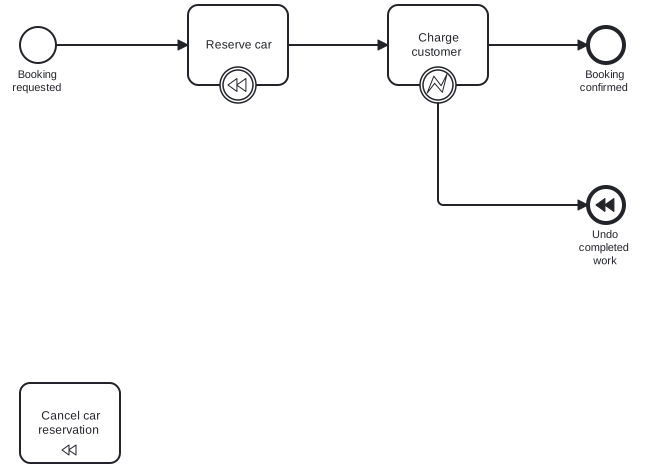
Diagram source
<?xml version="1.0" encoding="UTF-8"?><definitions xmlns="http://www.omg.org/spec/BPMN/20100524/MODEL" xmlns:bpmndi="http://www.omg.org/spec/BPMN/20100524/DI" xmlns:dc="http://www.omg.org/spec/DD/20100524/DC" xmlns:di="http://www.omg.org/spec/DD/20100524/DI" targetNamespace="http://example.org/bpmn"> <process id="booking" isExecutable="false"> <startEvent id="start" name="Booking requested"> <outgoing>f1</outgoing> </startEvent> <task id="reserve" name="Reserve car"> <incoming>f1</incoming> <outgoing>f2</outgoing> </task> <task id="pay" name="Charge customer"> <incoming>f2</incoming> <outgoing>f3</outgoing> </task> <endEvent id="done" name="Booking confirmed"> <incoming>f3</incoming> </endEvent> <boundaryEvent id="payError" attachedToRef="pay"> <outgoing>f4</outgoing> <errorEventDefinition /> </boundaryEvent> <endEvent id="undo" name="Undo completed work"> <incoming>f4</incoming> <compensateEventDefinition /> </endEvent> <boundaryEvent id="reserveComp" attachedToRef="reserve"> <compensateEventDefinition /> </boundaryEvent> <task id="cancelCar" name="Cancel car reservation" isForCompensation="true" /> <sequenceFlow id="f1" sourceRef="start" targetRef="reserve" /> <sequenceFlow id="f2" sourceRef="reserve" targetRef="pay" /> <sequenceFlow id="f3" sourceRef="pay" targetRef="done" /> <sequenceFlow id="f4" sourceRef="payError" targetRef="undo" /> <association id="a1" associationDirection="One" sourceRef="reserveComp" targetRef="cancelCar" /> </process> <bpmndi:BPMNDiagram id="BPMNDiagram_booking"> <bpmndi:BPMNPlane id="BPMNPlane_booking" bpmnElement="booking"> <bpmndi:BPMNShape id="BPMNShape_start" bpmnElement="start"> <dc:Bounds x="80" y="102" width="36" height="36" /> <bpmndi:BPMNLabel> <dc:Bounds x="65" y="143" width="67" height="28" /> </bpmndi:BPMNLabel> </bpmndi:BPMNShape> <bpmndi:BPMNShape id="BPMNShape_reserve" bpmnElement="reserve"> <dc:Bounds x="248" y="80" width="100" height="80" /> </bpmndi:BPMNShape> <bpmndi:BPMNShape id="BPMNShape_pay" bpmnElement="pay"> <dc:Bounds x="448" y="80" width="100" height="80" /> </bpmndi:BPMNShape> <bpmndi:BPMNShape id="BPMNShape_done" bpmnElement="done"> <dc:Bounds x="648" y="102" width="36" height="36" /> <bpmndi:BPMNLabel> <dc:Bounds x="631" y="143" width="70" height="28" /> </bpmndi:BPMNLabel> </bpmndi:BPMNShape> <bpmndi:BPMNShape id="BPMNShape_undo" bpmnElement="undo"> <dc:Bounds x="648" y="262" width="36" height="36" /> <bpmndi:BPMNLabel> <dc:Bounds x="631" y="303" width="70" height="42" /> </bpmndi:BPMNLabel> </bpmndi:BPMNShape> <bpmndi:BPMNShape id="BPMNShape_cancelCar" bpmnElement="cancelCar"> <dc:Bounds x="80" y="458" width="100" height="80" /> </bpmndi:BPMNShape> <bpmndi:BPMNShape id="BPMNShape_payError" bpmnElement="payError"> <dc:Bounds x="480" y="142" width="36" height="36" /> </bpmndi:BPMNShape> <bpmndi:BPMNShape id="BPMNShape_reserveComp" bpmnElement="reserveComp"> <dc:Bounds x="280" y="142" width="36" height="36" /> </bpmndi:BPMNShape> <bpmndi:BPMNEdge id="BPMNEdge_f1" bpmnElement="f1"> <di:waypoint x="116" y="120" /> <di:waypoint x="248" y="120" /> </bpmndi:BPMNEdge> <bpmndi:BPMNEdge id="BPMNEdge_f2" bpmnElement="f2"> <di:waypoint x="348" y="120" /> <di:waypoint x="448" y="120" /> </bpmndi:BPMNEdge> <bpmndi:BPMNEdge id="BPMNEdge_f3" bpmnElement="f3"> <di:waypoint x="548" y="120" /> <di:waypoint x="648" y="120" /> </bpmndi:BPMNEdge> <bpmndi:BPMNEdge id="BPMNEdge_f4" bpmnElement="f4"> <di:waypoint x="498" y="178" /> <di:waypoint x="498" y="280" /> <di:waypoint x="648" y="280" /> </bpmndi:BPMNEdge> </bpmndi:BPMNPlane> </bpmndi:BPMNDiagram></definitions>Checks
Section titled “Checks”- Each activity that may need undoing has a compensation boundary event attached to it.
- Each compensation boundary event links to exactly one handler through a directed association, not a sequence flow.
- The model triggers compensation with a throwing compensation event inside the process scope that holds the completed activities.
- Undo of a whole subprocess uses a compensation event subprocess as its handler.
Related
Section titled “Related”Sources
Section titled “Sources”- Compensation events | Camunda 8 Docs — docs.camunda.io, accessed 2026-11-09
- Cancel and Compensation Events | docs.camunda.org — docs.camunda.org, accessed 2026-11-09
- Error events | Camunda 8 Docs — docs.camunda.io, accessed 2026-11-09