Common Use Case Diagram Errors
Explanation
Section titled “Explanation”A use case diagram shows who uses a system and what they can do with it. (See the articles Use Case Diagram and Use Case for the basics.) A few mistakes appear again and again.
Actors inside the boundary. The boundary box marks the system. Actors are external to the system, so always draw them outside the box, never inside it.
Actors named after job titles. An actor is a role played by a user or an external system. It is not a job title. Titles and actor names are different things, and mixing them up is listed as a top mistake in use case modeling.
Technical parts as actors or use cases. Do not add a database, an API, or a server as an actor or a use case. These are technical components.
Misusing include and extend. Using these relationships without understanding their purpose gives a confusing model. The rules are short:
- Include is for behavior that always runs. Do not put optional steps in an include.
- Extend is conditional. It needs a guard condition, a condition that must hold for the extension to happen.
- That condition should be defined and testable. Otherwise the extension is meaningless. Visual Paradigm says such conditions belong in text specifications.
- The base use case must define named extension points, the places where an extension may attach. An open OMG issue asks whether a condition note may refer to an extension point the use case does not define. The question shows that extension points belong on the use case itself.
Wrong arrow direction. An include arrow points from the base use case to the included one. An extend arrow points from the extension to the base use case.
Generalization. Actor generalization is valid. A specialized actor inherits the use cases of the general actor.
Example
Section titled “Example”An online shop diagram has a box labeled “Shop”. Inside the box sits “Sales Manager”, drawn next to “Database”. Two fixes are needed. Move the actor outside the box and name the role, for example “Customer”. Remove “Database”, because it is a technical component. Then “Place Order” always needs “Check Stock”, so that is an include arrow from “Place Order” to “Check Stock”. “Apply Voucher” happens only if the customer enters a code. That is an extend arrow from “Apply Voucher” to “Place Order”. It carries the condition “voucher code entered”. “Place Order” defines a named extension point for it.
Trade-offs
Section titled “Trade-offs”The facts here give rules, not costs. One practical point: extend conditions belong in text specifications. A diagram alone therefore cannot show whether an extension is meaningful. Someone must also check the written condition.
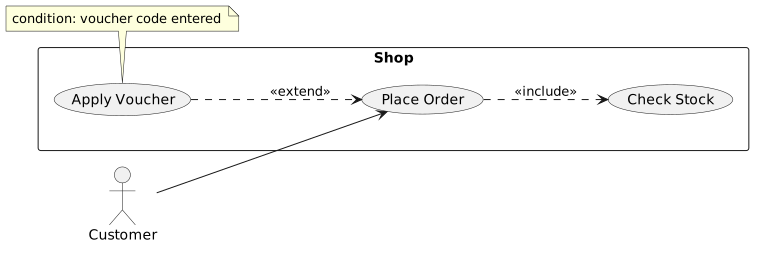
Diagram source
@startumlleft to right directionactor Customerrectangle Shop { usecase "Place Order" as PO usecase "Check Stock" as CS usecase "Apply Voucher" as AV}Customer --> POPO ..> CS : <<include>>AV ..> PO : <<extend>>note bottom of AV : condition: voucher code entered@endumlChecks
Section titled “Checks”- All actors are drawn outside the system boundary box.
- Actor names describe roles, not job titles.
- No database, API, or server appears as an actor or use case.
- Every extend relation has a defined, testable condition and a named extension point on the base use case.
- Include arrows point from base to included use case; extend arrows point from extension to base.
Related
Section titled “Related”- Use Case Diagram
- Use Case
- UML Modeling Anti-Pattern
- Common Class Diagram Modeling Mistakes
- UML Generalization and Specialization
- Use Case Template
- UML Modeling Best Practice
- Use Case Completeness Check
Sources
Section titled “Sources”- Beginner’s Tutorial: UML Use-Case Diagram Modeling — visual-paradigm.com, accessed 2026-11-09
- UML Use Case Diagram: A Beginner’s Guide — skills.visual-paradigm.com, accessed 2026-11-09
- Top 10 mistakes in Use Case Modelling — modernanalyst.com, accessed 2026-11-09
- Ultimate Guide to Use Case Diagrams in 2026 | Visual Paradigm — guides.visual-paradigm.com, accessed 2026-11-09
- Include vs Extend: Use Case Diagrams | Enterprise Architect — sparxsystems.us, accessed 2026-11-09
- UML Extend Include: Master Use Case Reuse — skills.visual-paradigm.com, accessed 2026-11-09
- UML 2.6 RTF — Open Issues - OMG Issue Tracker — issues.omg.org, accessed 2026-11-09