System Context Diagram
Explanation
Section titled “Explanation”A system context diagram shows your system as one box in the centre. Around the box you draw its users and the other systems it interacts with. Lines connect them.
Scope. The diagram covers a single software system. Neighbouring systems usually sit outside its boundary. So the diagram shows what is inside the system and what is not. The Context viewpoint of Rozanski and Woods asks for the same thing. It defines what the system does and does not do, and where its boundaries with the outside world lie.
Focus on people and systems. Show people, such as actors, roles and personas, and show software systems. Do not focus on technologies. Keep the detail low.
Audience. Everyone can read it: technical and non-technical people, inside and outside the development team.
Relationship to other ideas.
- In the C4 model, this diagram is a good starting point for documenting a system. C4 recommends it for all software development teams.
- In arc42 section 3, the diagram separates the system’s scope from all its communication partners and defines its external interfaces. The business context aims for all stakeholders to understand which data the system exchanges with its environment. arc42 accepts any kind of black-box diagram for this. The technical context covers the technical interfaces, meaning the channels and transmission media that link the system to its environment. See the article Business and Technical Context for more.
- The Context viewpoint also covers the relationships, dependencies and interactions between the system and its environment. It looks at the external entities, the data used, and the system’s impact on its environment.
Example
Section titled “Example”An online library lending system is drawn as one box in the middle. Readers and librarians are people placed around it. A payment service and a book catalog provider are external systems placed around it too. Each line carries a short label, such as “pays fines” or “looks up book details”. Nothing inside the box is shown.
Trade-offs
Section titled “Trade-offs”The diagram keeps detail low on purpose. It shows who and what the system talks to, but not technologies or internals. Technical interfaces need the separate technical context described in arc42.
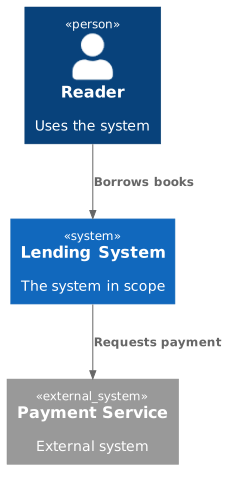
Diagram source
@startuml!include <C4/C4_Context>Person(user, "Reader", "Uses the system")System(sys, "Lending System", "The system in scope")System_Ext(pay, "Payment Service", "External system")Rel(user, sys, "Borrows books")Rel(sys, pay, "Requests payment")@endumlChecks
Section titled “Checks”- The diagram shows the system as one box surrounded by its users and the external systems it interacts with.
- The diagram focuses on people and software systems, not technologies.
- Neighbouring systems are drawn outside the system boundary, so the scope is clear.
- Stakeholders can see which data is exchanged with the environment.
Related
Section titled “Related”- Context View
- Business and Technical Context
- arc42 Context and Scope
- C4 Model
- Container Diagram (C4 Level 2)
- Context View Antipatterns
- Context View Antipattern: Forgetting Bidirectional Data Flows
- Refining Complex Context Views
Sources
Section titled “Sources”- System context diagram | C4 model — c4model.com, accessed 2026-11-09
- 3 - Context and scope | arc42 Documentation — docs.arc42.org, accessed 2026-11-09
- Software Systems Architecture — viewpoints-and-perspectives.info, accessed 2026-11-09