Runtime View
Explanation
Section titled “Explanation”A static view shows which building blocks exist. The runtime view shows what they do. It describes concrete behavior and interactions, written as scenarios (f1, f8).
What to cover
The arc42 template (see “arc42 Architecture Documentation Template”) names several kinds of scenarios (f8):
- Key use cases.
- Interactions across external interfaces.
- Start-up and administration.
- Error cases.
Choosing scenarios
You do not document every flow. The main test is architectural relevance (f2). Pick scenarios that teach a reader something important about how the system is built. Skip the rest.
Notations
Many notations work. arc42 lists step lists, flowcharts, sequence diagrams, BPMN and state machines (f3). It specifically suggests sequence diagrams (f7). See “UML Sequence Diagram” for how they read.
The C4 model has a similar idea, called a dynamic diagram. It shows how elements from the static model collaborate at runtime (f9). It builds on UML communication diagrams, which number the interactions. You can also draw it in sequence style (f10).
Traceability
Each activity in a scenario should map to an existing building block (f6). That keeps the runtime view consistent with the static structure.
Example
Section titled “Example”Imagine an online shop. The team documents “customer places an order” as a numbered list:
- The web shop receives the order.
- The web shop asks the payment service to charge the card.
- The payment service confirms.
- The web shop passes the order to the warehouse system.
Each named actor is a building block already shown in the static view. The team skips minor flows, such as changing a profile photo, because they teach nothing about the architecture.
Trade-offs
Section titled “Trade-offs”The facts support one clear limit: you must choose. Scenarios are selected for architectural relevance, not completeness (f2). A runtime view will therefore leave many flows undocumented on purpose.
You also have a choice of notation. Sequence diagrams are the suggested default (f7), but other notations are listed as valid (f3).
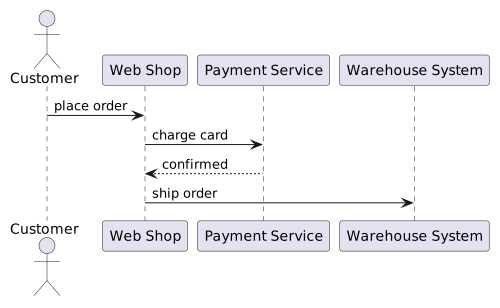
Diagram source
@startumlactor Customerparticipant "Web Shop" as Wparticipant "Payment Service" as Pparticipant "Warehouse System" as HCustomer -> W : place orderW -> P : charge cardP --> W : confirmedW -> H : ship order@endumlChecks
Section titled “Checks”- Scenarios are selected for architectural relevance, not to cover every flow.
- Each activity in a runtime scenario maps to an existing building block.
- The runtime view covers key use cases, external interfaces, start-up or administration, and error cases as scenarios.
- Scenarios use a recognized notation, such as sequence diagrams, step lists, flowcharts or BPMN.
Related
Section titled “Related”- UML Sequence Diagram
- arc42 Architecture Documentation Template
- C4 Model
- Component View
- Essential Architecture Views (Context, Component, Runtime, Distribution)
- Runtime View Antipattern: Code-Level Activity Diagram
- Traceability
- BPMN 2.0 Notation
Sources
Section titled “Sources”- 6 - Runtime view | arc42 Documentation — docs.arc42.org, accessed 2026-11-09
- Dynamic diagram | C4 model — c4model.com, accessed 2026-11-09