UML Sequence Diagram
Explanation
Section titled “Explanation”A sequence diagram shows interactions in time order. Each participant gets a lifeline. A lifeline is a vertical line. The lines run in parallel because the participants exist at the same time.
Messages are arrows between lifelines. Reading down the page follows the order of events.
Two more elements help readers:
- Activation bars are thin rectangles drawn on a lifeline. They show that a participant is busy working because of a message it received.
- Destruction is drawn as an X below a lifeline. After the X, the line stops.
The notation is strongly inspired by the Message Sequence Chart, a diagram standardized by the ITU. According to Wikipedia, the first version of that standard appeared in 1993.
In architecture work, a main use is the runtime view. This part of the documentation describes how building blocks work together while the system runs. See the article Runtime View. arc42 lists sequence diagrams as one option. Other options are activity diagrams, BPMN or EPCs, state machines, and numbered step lists. arc42 recommends sequence diagrams because they show clearly which building block is responsible for what. That helps teams discuss the building blocks.
Example
Section titled “Example”Imagine a web shop with three participants: Browser, Shop, and Payment Service. The Browser sends “place order” to the Shop. The Shop sends “charge card” to the Payment Service. The Payment Service answers, and the Shop answers the Browser. Reading down the page, a reader sees the order of the calls. A reader also sees that the Shop coordinates the work and the Payment Service handles the charge.
Trade-offs
Section titled “Trade-offs”A sequence diagram is one notation among several for runtime scenarios. arc42 also lists activity diagrams, BPMN or EPCs, state machines, and numbered step lists. Pick the one that fits the scenario and the readers.
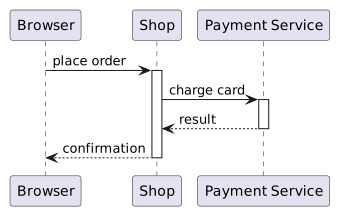
Diagram source
@startumlparticipant Browserparticipant Shopparticipant "Payment Service" as PayBrowser -> Shop : place orderactivate ShopShop -> Pay : charge cardactivate PayPay --> Shop : resultdeactivate PayShop --> Browser : confirmationdeactivate Shop@endumlChecks
Section titled “Checks”- Runtime scenarios in the runtime view are described with sequence diagrams (or another listed notation) so each building block’s responsibility is visible.
- Each participant in a sequence diagram has its own lifeline, and the diagram reads in time order.
Related
Section titled “Related”- Runtime View
- Common Sequence Diagram Mistake
- Message Types in Sequence Diagrams
- Unified Modeling Language (UML)
- arc42 Architecture Documentation Template
- UML Behavioral Diagram
Sources
Section titled “Sources”- Tip 6-11: Use sequence diagrams to describe or specify runtime scenarios! | arc42 Documentation — docs.arc42.org, accessed 2026-11-09
- Sequence diagram - Wikipedia — en.wikipedia.org, accessed 2026-11-09
- 6 - Runtime view | arc42 Documentation — docs.arc42.org, accessed 2026-11-09
- Message sequence chart - Wikipedia — en.wikipedia.org, accessed 2026-11-09