Package Diagram Modeling Mistake
Explanation
Section titled “Explanation”A package diagram groups model elements into packages and shows how the packages relate. A few errors appear again and again.
Cyclic dependencies. Package A depends on B, and B depends on A, directly or through other packages. This causes real problems:
- A change spreads further than it should.
- Packages in the cycle cannot be released or upgraded on their own. They must move together.
- A cycle-free structure can be drawn as a directed acyclic graph, which is a set of arrows with no loop back. Avoiding cycles lowers coupling between packages.
See Coupling and Cohesion for background on coupling.
Wrong containment. A package is a namespace for its members. A namespace is a named scope that holds elements. A package may contain other packages. Containment runs from the package to its members. A drawing where a class contains a package turns this around, so it is an error.
Misused merge. Package merge is meant for elements in different packages that share a name and stand for the same concept. The result equals a model in which all merges were already done. It applies to packages, so do not use it to join a package and a class.
Unlabeled or mixed-up relationships. Import, access, and merge mean different things.
- An import makes the members of another package available in the importing package.
- A public import also makes those elements visible outside the importing package.
- A private import is marked with the keyword «access» instead of «import».
- An import’s default visibility is that of the imported element.
An arrow with no keyword leaves readers guessing which meaning you intended. The article Package Relationships (Import, Access, Merge, Use) covers them in detail.
Structure and use. In the arc42 building block view, packages can serve as building blocks. That view is a static decomposition of the system into black boxes and white boxes. arc42 recommends that cohesion be the main driver when forming building blocks. The same guideline applies to a cohesive package structure.
Example
Section titled “Example”A team draws three packages: Orders, Billing, and Customers. Orders depends on Billing, Billing on Customers, and Customers on Orders. That is a cycle. Changing Customers can ripple into all three, and none can be released alone. They then draw an unlabeled arrow from Orders to Billing. Readers cannot tell whether it is an import, an access, or a merge. They fix the diagram by breaking the loop and labeling each arrow with its keyword.
Trade-offs
Section titled “Trade-offs”Removing a cycle takes design effort, because the shared parts must be moved or restructured. The facts here do not say how to do it. The payoff is lower coupling and packages that can be released independently.
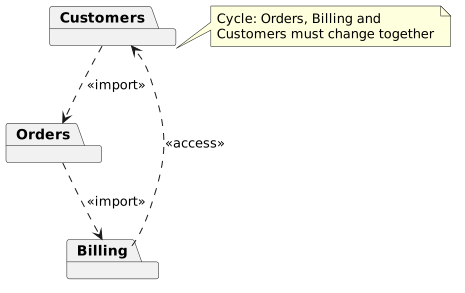
Diagram source
@startumlpackage Orderspackage Billingpackage CustomersOrders ..> Billing : <<import>>Billing ..> Customers : <<access>>Customers ..> Orders : <<import>>note right of Customers : Cycle: Orders, Billing and\nCustomers must change together@endumlChecks
Section titled “Checks”- The package dependencies contain no cycles and can be drawn as a directed acyclic graph.
- Every relationship between packages carries a keyword such as import or access, so the meaning is clear.
- Containment goes from package to members: packages contain classes or other packages, never the reverse.
- Package merge is used only between packages, for elements that represent the same concept.
- Packages used as building blocks are grouped by cohesion.
Related
Section titled “Related”- Package Diagram
- Package Relationships (Import, Access, Merge, Use)
- Coupling and Cohesion
- Differences between Class, Component and Package Diagrams
- UML Modeling Anti-Pattern
- Common Class Diagram Modeling Mistakes
- High Cohesion
- Loose Coupling
Sources
Section titled “Sources”- DCL60-J. Avoid cyclic dependencies between packages | CERT Secure Coding — cmu-sei.github.io, accessed 2026-11-09
- Package Diagram - UML 2 Diagrams - UML Modeling Tool — visual-paradigm.com, accessed 2026-11-09
- 5 - Building block view | arc42 Documentation — docs.arc42.org, accessed 2026-11-09