Timeout-based Delivery
Explanation
Section titled “Explanation”Timeout-based delivery is a way for a message queue to hand out work without losing it. Amazon SQS calls the timeout a visibility timeout. Azure Service Bus calls the same idea Peek-Lock.
How it works
- A consumer receives a message. The message stays in the queue, but other consumers cannot see it for a limited time. Service Bus does this with an exclusive lock.
- The consumer processes the message.
- On success, the consumer deletes the message before the timeout ends. Service Bus calls this step Complete.
- If the timeout expires first, the message becomes visible again. Another consumer can pick it up.
Why it matters
A crash or a connectivity problem means the consumer never deletes the message. The timeout runs out and the message is retried, so it is not lost.
Duplicates
This model is at-least-once delivery: a message arrives one or more times. Even inside the timeout, SQS gives no absolute guarantee against a second delivery. Pub/Sub acknowledgment deadlines are also not guaranteed to be respected unless exactly-once delivery is enabled. Consumers should therefore cope with duplicates. The Idempotent Receiver article covers this.
Choosing the timeout
- Size it to your normal processing time. Service Bus advises a lock longer than normal processing, so you rarely need to renew it. Its lock defaults to 1 minute, with a 5-minute maximum. The SQS default is 30 seconds.
- A long timeout delays retries after a failure.
- For slow jobs, extend the timeout periodically with a heartbeat (see the Heartbeat article). SQS has a 12-hour cap that extensions do not reset. The lock owner can also renew a Service Bus lock.
Giving a message back early or rejecting it
- In SQS, setting the timeout to 0 releases a message to other consumers at once.
- In Service Bus, Abandon releases it immediately. DeadLetter rejects it when a retry won’t help.
Messages that keep failing
A dead-letter queue collects messages that fail after several attempts. They then stop circulating in the main queue. See the Dead Letter Channel article.
Example
Section titled “Example”A shop’s queue holds order-confirmation emails to send. Worker A receives one and the queue hides it for 30 seconds. Worker A crashes. After 30 seconds the message reappears, and Worker B sends the email. If Worker A had actually sent the email just before crashing, the customer gets two emails. To avoid this, the sender records which order IDs it has already handled.
Trade-offs
Section titled “Trade-offs”- Safety versus duplicates. Explicit deletion means a failed consumer does not lose work. The price is that a message may be processed more than once.
- Short versus long timeout. A short timeout retries quickly after a failure. A timeout that is too long delays retries.
- Compared with at-most-once. Service Bus Receive-and-Delete consumes the message as soon as it is sent. If the transfer fails, the message is lost. Peek-Lock avoids this loss by requiring explicit settlement.
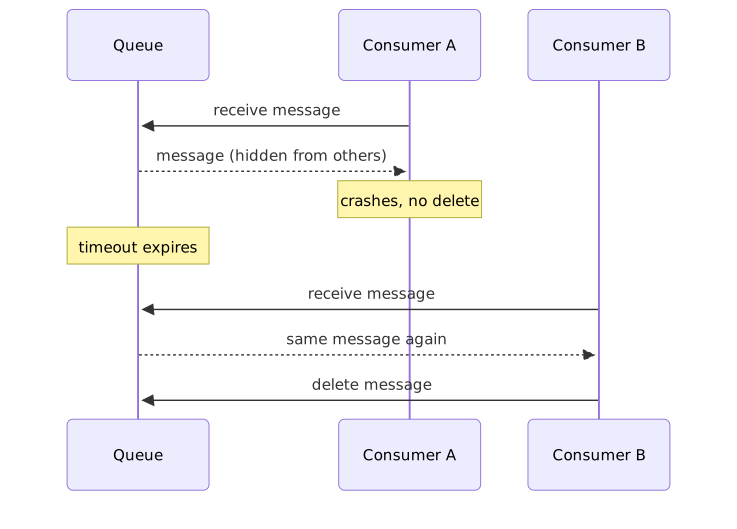
Diagram source
sequenceDiagram participant Q as Queue participant A as Consumer A participant B as Consumer B A->>Q: receive message Q-->>A: message (hidden from others) Note over A: crashes, no delete Note over Q: timeout expires B->>Q: receive message Q-->>B: same message again B->>Q: delete messageChecks
Section titled “Checks”- The visibility timeout or lock duration is set deliberately and is longer than normal processing time.
- Consumers are designed to handle duplicate delivery, because the queue is at-least-once.
- Long-running jobs extend the timeout with a heartbeat, within the maximum limit.
- A dead-letter queue is configured for messages that keep failing.
Related
Section titled “Related”- Idempotent Receiver
- Dead Letter Channel
- Heartbeat
- Retry
- Messaging
- Polling Consumer
- Message Channel
- Point-to-Point Channel
Sources
Section titled “Sources”- Amazon SQS visibility timeout - Amazon Simple Queue Service — docs.aws.amazon.com, accessed 2026-11-09
- Message Transfers, Locks, and Settlement - Azure Service Bus | Microsoft Learn — learn.microsoft.com, accessed 2026-11-09
- Extend ack time with lease management | Pub/Sub | Google Cloud Documentation — docs.cloud.google.com, accessed 2026-11-09