arc42 Context and Scope
Explanation
Section titled “Explanation”This chapter shows where the system sits in its surroundings. The system appears as a black box: you see its outside, not its inner parts. Around it are its communication partners, meaning the users and neighboring systems it talks to.
Business context. This part shows the domain interfaces to each communication partner. It answers a simple question: what data goes in and out? All stakeholders (people with an interest in the system) should be able to understand this exchange. See Business and Technical Context.
Technical context. This part covers the technical interfaces: the channels and transmission media that link the system to its environment. It also maps each domain input or output to the channel that carries it. Many stakeholders base architectural decisions on these interfaces, so they deserve care.
Diagram and table. Any diagram works if it shows the system as a black box and names the domain interfaces to its partners. A table can replace the diagram or sit next to it.
C4 option. A C4 system context diagram is a good starting point for documenting a system. It puts the system as a box in the center, surrounded by users and external systems. The focus stays on people and software systems, not on technologies or protocols. That makes it a fit for the business context. See System Context Diagram.
Example
Section titled “Example”A small online shop is the system. Its business context lists a customer (sends orders, receives confirmations), a payment provider (receives payment requests, returns approvals) and a shipping partner (receives parcel details). The technical context then adds a mapping: for each of these exchanges, it names the channel that carries it. A reader can see at a glance who talks to the shop, what they exchange, and over which channel.
Trade-offs
Section titled “Trade-offs”A C4 context diagram leaves out technologies and protocols on purpose. If you need those details, you must add them in the technical context, for example as a table or a mapping of data to channels. A diagram alone may therefore not be enough.
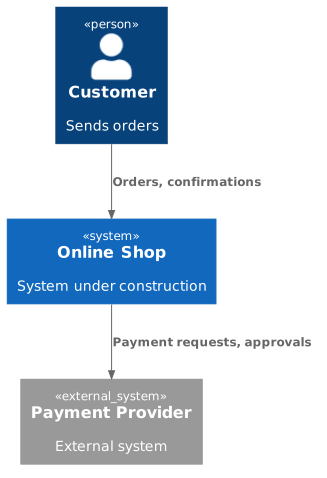
Diagram source
@startuml!include <C4/C4_Context>Person(customer, "Customer", "Sends orders")System(shop, "Online Shop", "System under construction")System_Ext(pay, "Payment Provider", "External system")Rel(customer, shop, "Orders, confirmations")Rel(shop, pay, "Payment requests, approvals")@endumlChecks
Section titled “Checks”- The context diagram shows the system as a black box with its communication partners around it.
- The domain data exchanged with each partner is stated, so all stakeholders can understand it.
- The technical context maps each domain input or output to the channel that carries it.
- A table, alone or next to the diagram, describes the interfaces.
Related
Section titled “Related”- Business and Technical Context
- System Context Diagram
- Context View
- Context View Antipatterns
- arc42 Architecture Documentation Template
- arc42 Introduction and Goals
- C4 Model
- Stakeholder
Sources
Section titled “Sources”- 3 - Context and scope | arc42 Documentation — docs.arc42.org, accessed 2026-11-09
- System context diagram | C4 model — c4model.com, accessed 2026-11-09