Workflow Pattern
Explanation
Section titled “Explanation”A workflow pattern is a named control-flow structure that recurs in process models. Control flow means the order in which steps run, and how the path splits or joins.
Patterns from the verified set
- Sequence. A step becomes enabled once the step before it in the same process completes.
- Parallel split. One branch diverges into two or more branches that run at the same time.
- Simple merge. Whenever any incoming branch is enabled, control passes to the next branch. Nothing waits for the other branches.
- Arbitrary cycles. Loops in a process model may have more than one entry or exit point.
- Deferred choice. The branch taken is picked through interaction with the operating environment, not by the process itself.
How the patterns map to BPMN
BPMN is a process notation. Its gateways split and join the flow. See the article BPMN Gateway.
- A parallel gateway used as a split takes all outgoing flows. This is the parallel split.
- A parallel gateway used as a join makes the process instance wait until every incoming flow has arrived.
- An exclusive gateway used as a split takes the first flow whose condition is fulfilled.
- An exclusive gateway used as a merge only passes control through. It does not synchronize concurrent flows. This matches simple merge.
Confusing a pass-through merge with a waiting join is a typical modeling error. See BPMN Gateway Mismatch Antipatterns.
What the patterns are used for
The patterns served as initial requirements for designing the workflow language and system YAWL (Yet Another Workflow Language). They have also been used to evaluate proposed standards: BPEL, BPMN, UML Activity diagrams and XPDL.
Other groups proposed further pattern sets beyond control flow. These cover data, resources and exception handling.
Example
Section titled “Example”A support team handles a refund request. A clerk registers the request, then a second step checks the order. That is a sequence. After the check, two branches start together: one prepares the payment and one notifies the customer. That is a parallel split. A join then waits until both branches finish. Another place in the process lets either of two alternative review paths continue immediately. That is a simple merge, and it does not wait.
Trade-offs
Section titled “Trade-offs”The facts here describe what the patterns are and where they are used. They do not weigh costs. One practical caution follows from the BPMN mapping: a merge that passes control through behaves differently from a join that waits. Choose the gateway that matches the pattern you intend.
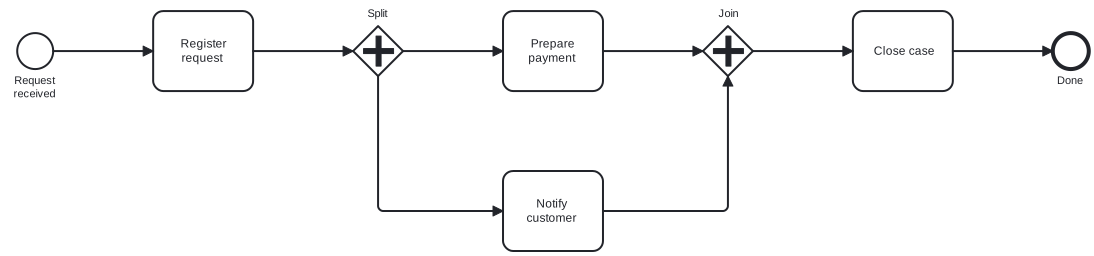
Diagram source
<?xml version="1.0" encoding="UTF-8"?><definitions xmlns="http://www.omg.org/spec/BPMN/20100524/MODEL" xmlns:bpmndi="http://www.omg.org/spec/BPMN/20100524/DI" xmlns:dc="http://www.omg.org/spec/DD/20100524/DC" xmlns:di="http://www.omg.org/spec/DD/20100524/DI" targetNamespace="http://example.org/wp"> <process id="refund" isExecutable="false"> <startEvent id="s" name="Request received"> <outgoing>f1</outgoing> </startEvent> <task id="register" name="Register request"> <incoming>f1</incoming> <outgoing>f2</outgoing> </task> <parallelGateway id="split" name="Split"> <incoming>f2</incoming> <outgoing>f3</outgoing> <outgoing>f4</outgoing> </parallelGateway> <task id="pay" name="Prepare payment"> <incoming>f3</incoming> <outgoing>f5</outgoing> </task> <task id="notify" name="Notify customer"> <incoming>f4</incoming> <outgoing>f6</outgoing> </task> <parallelGateway id="join" name="Join"> <incoming>f5</incoming> <incoming>f6</incoming> <outgoing>f7</outgoing> </parallelGateway> <task id="close" name="Close case"> <incoming>f7</incoming> <outgoing>f8</outgoing> </task> <endEvent id="e" name="Done"> <incoming>f8</incoming> </endEvent> <sequenceFlow id="f1" sourceRef="s" targetRef="register" /> <sequenceFlow id="f2" sourceRef="register" targetRef="split" /> <sequenceFlow id="f3" sourceRef="split" targetRef="pay" /> <sequenceFlow id="f4" sourceRef="split" targetRef="notify" /> <sequenceFlow id="f5" sourceRef="pay" targetRef="join" /> <sequenceFlow id="f6" sourceRef="notify" targetRef="join" /> <sequenceFlow id="f7" sourceRef="join" targetRef="close" /> <sequenceFlow id="f8" sourceRef="close" targetRef="e" /> </process> <bpmndi:BPMNDiagram id="BPMNDiagram_refund"> <bpmndi:BPMNPlane id="BPMNPlane_refund" bpmnElement="refund"> <bpmndi:BPMNShape id="BPMNShape_s" bpmnElement="s"> <dc:Bounds x="80" y="102" width="36" height="36" /> <bpmndi:BPMNLabel> <dc:Bounds x="68" y="143" width="60" height="28" /> </bpmndi:BPMNLabel> </bpmndi:BPMNShape> <bpmndi:BPMNShape id="BPMNShape_register" bpmnElement="register"> <dc:Bounds x="216" y="80" width="100" height="80" /> </bpmndi:BPMNShape> <bpmndi:BPMNShape id="BPMNShape_split" bpmnElement="split" isMarkerVisible="true"> <dc:Bounds x="416" y="95" width="50" height="50" /> <bpmndi:BPMNLabel> <dc:Bounds x="421" y="76" width="41" height="14" /> </bpmndi:BPMNLabel> </bpmndi:BPMNShape> <bpmndi:BPMNShape id="BPMNShape_pay" bpmnElement="pay"> <dc:Bounds x="566" y="80" width="100" height="80" /> </bpmndi:BPMNShape> <bpmndi:BPMNShape id="BPMNShape_notify" bpmnElement="notify"> <dc:Bounds x="566" y="240" width="100" height="80" /> </bpmndi:BPMNShape> <bpmndi:BPMNShape id="BPMNShape_join" bpmnElement="join" isMarkerVisible="true"> <dc:Bounds x="766" y="95" width="50" height="50" /> <bpmndi:BPMNLabel> <dc:Bounds x="774" y="76" width="34" height="14" /> </bpmndi:BPMNLabel> </bpmndi:BPMNShape> <bpmndi:BPMNShape id="BPMNShape_close" bpmnElement="close"> <dc:Bounds x="916" y="80" width="100" height="80" /> </bpmndi:BPMNShape> <bpmndi:BPMNShape id="BPMNShape_e" bpmnElement="e"> <dc:Bounds x="1116" y="102" width="36" height="36" /> <bpmndi:BPMNLabel> <dc:Bounds x="1117" y="143" width="34" height="14" /> </bpmndi:BPMNLabel> </bpmndi:BPMNShape> <bpmndi:BPMNEdge id="BPMNEdge_f1" bpmnElement="f1"> <di:waypoint x="116" y="120" /> <di:waypoint x="216" y="120" /> </bpmndi:BPMNEdge> <bpmndi:BPMNEdge id="BPMNEdge_f2" bpmnElement="f2"> <di:waypoint x="316" y="120" /> <di:waypoint x="416" y="120" /> </bpmndi:BPMNEdge> <bpmndi:BPMNEdge id="BPMNEdge_f3" bpmnElement="f3"> <di:waypoint x="466" y="120" /> <di:waypoint x="566" y="120" /> </bpmndi:BPMNEdge> <bpmndi:BPMNEdge id="BPMNEdge_f5" bpmnElement="f5"> <di:waypoint x="666" y="120" /> <di:waypoint x="766" y="120" /> </bpmndi:BPMNEdge> <bpmndi:BPMNEdge id="BPMNEdge_f7" bpmnElement="f7"> <di:waypoint x="816" y="120" /> <di:waypoint x="916" y="120" /> </bpmndi:BPMNEdge> <bpmndi:BPMNEdge id="BPMNEdge_f8" bpmnElement="f8"> <di:waypoint x="1016" y="120" /> <di:waypoint x="1116" y="120" /> </bpmndi:BPMNEdge> <bpmndi:BPMNEdge id="BPMNEdge_f4" bpmnElement="f4"> <di:waypoint x="441" y="145" /> <di:waypoint x="441" y="280" /> <di:waypoint x="566" y="280" /> </bpmndi:BPMNEdge> <bpmndi:BPMNEdge id="BPMNEdge_f6" bpmnElement="f6"> <di:waypoint x="666" y="280" /> <di:waypoint x="791" y="280" /> <di:waypoint x="791" y="145" /> </bpmndi:BPMNEdge> </bpmndi:BPMNPlane> </bpmndi:BPMNDiagram></definitions>Checks
Section titled “Checks”- Where a process runs branches in parallel, a parallel gateway splits the flow and a parallel gateway joins it again.
- Exclusive gateways are used as merges only where the incoming branches are alternatives, since they do not synchronize concurrent flows.
- Each exclusive split has conditions on its outgoing flows, because the gateway takes the first flow whose condition is fulfilled.
Related
Section titled “Related”- BPMN Gateway
- BPMN Gateway Mismatch Antipatterns
- Lack of Synchronization
- Deadlock in Process Models
- Event-Based Gateway
- Process Notations Comparison (EPC, BPMN, UML Activity Diagram)
- Soundness of Process Models
- BPMN 2.0 Notation
Sources
Section titled “Sources”- Workflow Process Patterns Support — docs.tibco.com, accessed 2026-11-09
- Workflow pattern - Wikipedia — en.wikipedia.org, accessed 2026-11-09
- Parallel gateway | Camunda 8 Docs — docs.camunda.io, accessed 2026-11-08
- Exclusive gateway | Camunda 8 Docs — docs.camunda.io, accessed 2026-11-08