BPMN Diagram Types
Explanation
Section titled “Explanation”BPMN is a notation for drawing business processes. It has more than one diagram type. Each type shows a different level of detail.
Collaboration diagram
A collaboration shows pools and the message flows between them. A pool stands for a participant. A message flow is a line showing a message passing from one pool to another.
A pool can take one of three forms:
- It can be empty.
- It can be a black box. You see the participant but not its inner workings.
- It can be a white box. You see the process inside the pool.
In a public process, the partners’ internal processes stay hidden as black boxes. Only the messages between the partners are visible.
Conversation diagram
A conversation diagram is a high-level view of communication. It leaves out the internal steps of each process. It answers one question: which communication topics exist between the participants?
Conversation links carry no order or timing. They are not sequence flows. A conversation diagram also does not show the order of messages. A collaboration diagram does show this. So the two types complement each other.
Choreography diagram
Choreography diagrams are new in BPMN 2.0. They focus on interactions and message flows between processes. Their focus is the messages between the participant pools.
Choosing a type
- Use a conversation diagram for an overview of which topics the participants discuss.
- Use a collaboration diagram when you need to see how messages flow between participants.
- Use a choreography diagram when the interaction between processes is the main subject.
Example
Section titled “Example”A web shop works with a payment provider. A conversation diagram lists the topics the two talk about, such as payment. It shows no steps and no order. A collaboration diagram then draws the shop as a white-box pool with its process inside. It draws the payment provider as a black-box pool. A message flow connects them, so readers see the exchange without the provider’s internals.
Trade-offs
Section titled “Trade-offs”A conversation diagram is quick to read, but it hides sequence and timing. A collaboration diagram shows the message flow, but it needs more detail and takes more effort to draw. Black-box pools keep partner internals out of view. The cost is that readers cannot see what happens inside those partners.
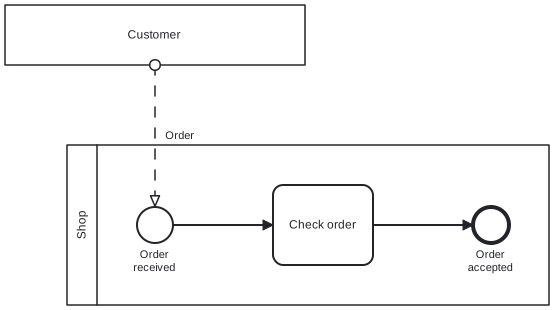
Diagram source
<?xml version="1.0" encoding="UTF-8"?><definitions xmlns="http://www.omg.org/spec/BPMN/20100524/MODEL" xmlns:bpmndi="http://www.omg.org/spec/BPMN/20100524/DI" xmlns:dc="http://www.omg.org/spec/DD/20100524/DC" xmlns:di="http://www.omg.org/spec/DD/20100524/DI" targetNamespace="http://example.com/bpmn"> <collaboration id="collab"> <participant id="pCustomer" name="Customer" /> <participant id="pShop" name="Shop" processRef="shopProcess" /> <messageFlow id="mf1" name="Order" sourceRef="pCustomer" targetRef="start" /> </collaboration> <process id="shopProcess" isExecutable="false"> <startEvent id="start" name="Order received"> <outgoing>s1</outgoing> </startEvent> <task id="check" name="Check order"> <incoming>s1</incoming> <outgoing>s2</outgoing> </task> <endEvent id="end" name="Order accepted"> <incoming>s2</incoming> </endEvent> <sequenceFlow id="s1" sourceRef="start" targetRef="check" /> <sequenceFlow id="s2" sourceRef="check" targetRef="end" /> </process> <bpmndi:BPMNDiagram id="BPMNDiagram_collab"> <bpmndi:BPMNPlane id="BPMNPlane_collab" bpmnElement="collab"> <bpmndi:BPMNShape id="BPMNShape_pCustomer" bpmnElement="pCustomer" isHorizontal="true"> <dc:Bounds x="80" y="80" width="300" height="60" /> </bpmndi:BPMNShape> <bpmndi:BPMNShape id="BPMNShape_pShop" bpmnElement="pShop" isHorizontal="true"> <dc:Bounds x="142" y="220" width="482" height="160" /> </bpmndi:BPMNShape> <bpmndi:BPMNEdge id="BPMNEdge_mf1" bpmnElement="mf1"> <di:waypoint x="230" y="140" /> <di:waypoint x="230" y="282" /> <bpmndi:BPMNLabel> <dc:Bounds x="235" y="204" width="41" height="14" /> </bpmndi:BPMNLabel> </bpmndi:BPMNEdge> <bpmndi:BPMNShape id="BPMNShape_start" bpmnElement="start"> <dc:Bounds x="212" y="282" width="36" height="36" /> <bpmndi:BPMNLabel> <dc:Bounds x="200" y="323" width="60" height="28" /> </bpmndi:BPMNLabel> </bpmndi:BPMNShape> <bpmndi:BPMNShape id="BPMNShape_check" bpmnElement="check"> <dc:Bounds x="348" y="260" width="100" height="80" /> </bpmndi:BPMNShape> <bpmndi:BPMNShape id="BPMNShape_end" bpmnElement="end"> <dc:Bounds x="548" y="282" width="36" height="36" /> <bpmndi:BPMNLabel> <dc:Bounds x="536" y="323" width="60" height="28" /> </bpmndi:BPMNLabel> </bpmndi:BPMNShape> <bpmndi:BPMNEdge id="BPMNEdge_s1" bpmnElement="s1"> <di:waypoint x="248" y="300" /> <di:waypoint x="348" y="300" /> </bpmndi:BPMNEdge> <bpmndi:BPMNEdge id="BPMNEdge_s2" bpmnElement="s2"> <di:waypoint x="448" y="300" /> <di:waypoint x="548" y="300" /> </bpmndi:BPMNEdge> </bpmndi:BPMNPlane> </bpmndi:BPMNDiagram></definitions>Checks
Section titled “Checks”- A diagram meant as a topic overview omits internal process steps and does not imply message order.
- Where a collaboration diagram shows a partner’s internals as hidden, that partner’s pool is drawn as a black box.
- Where message order between participants matters, a collaboration diagram is used rather than a conversation diagram.
Related
Section titled “Related”- BPMN Collaboration Diagram
- BPMN Conversation Diagram
- BPMN Swimlane (Pool and Lane)
- BPMN 2.0 Notation
- Data Exchange between BPMN Processes
- Levels of Process Modeling
- BPMN Modeling Guidelines
- Runtime View
Sources
Section titled “Sources”- BPMN Orchestration vs Choreography vs Collaboration — visual-paradigm.com, accessed 2026-11-09
- What Is a BPMN Conversation Diagram? | BPMN Guide — skills.visual-paradigm.com, accessed 2026-11-09