BPMN Data Element
Explanation
Section titled “Explanation”A BPMN process diagram mainly shows the order of work. Data elements add the information that the work uses, creates or changes. The article “BPMN Core Elements” covers the wider notation.
Data objects. A data object stands for information that is created, updated or consumed during a process. It sits outside the sequence flow, which is the set of arrows that sets the order of steps. Even so, every flow object in a given process instance can use it. A process instance is one run of the process. The article “Process Model versus Process Instance” explains the difference.
Data stores. A data store is a persistent repository, such as a database or a file system. Unlike a data object, it persists beyond the lifetime of the process instance.
Data associations. A data association links data elements to activities, processes and global tasks. Tools draw them as dashed lines with arrowheads that connect data objects to activities.
Data flow versus sequence flow. Data flow follows data associations. It does not follow sequence flows. The order of tasks and the movement of data are two separate things in the diagram.
Modeling only. Tools may treat data elements as documentation. Camunda supports data objects and data stores for modeling purposes only, not execution. UiPath Maestro also treats data objects as modeling-only elements.
Example
Section titled “Example”An order process has a task “Check order” and a later task “Ship order”. The diagram holds one data object called “Order”. A dashed arrow runs from “Check order” to “Order”. Another runs from “Order” to “Ship order”. The arrows show which task uses the information. A data store called “Customer database” sits beside the process. Its content remains after this order instance ends.
Trade-offs
Section titled “Trade-offs”Data elements make the information a process depends on visible. They also add symbols and dashed lines to the diagram. Because some tools treat them as modeling-only, they may document the process without changing how it runs. Add them where the information matters to the reader.
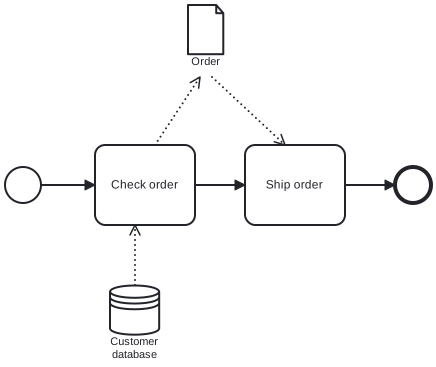
Diagram source
<?xml version="1.0" encoding="UTF-8"?><definitions xmlns="http://www.omg.org/spec/BPMN/20100524/MODEL" xmlns:bpmndi="http://www.omg.org/spec/BPMN/20100524/DI" xmlns:dc="http://www.omg.org/spec/DD/20100524/DC" xmlns:di="http://www.omg.org/spec/DD/20100524/DI" targetNamespace="http://example.com/bpmn"> <dataStore id="ds1" name="Customer database" /> <process id="p1" isExecutable="false"> <dataObject id="do1" name="Order" /> <dataObjectReference id="ref1" name="Order" dataObjectRef="do1" /> <dataStoreReference id="dsr1" name="Customer database" dataStoreRef="ds1" /> <startEvent id="s"> <outgoing>f1</outgoing> </startEvent> <task id="t1" name="Check order"> <incoming>f1</incoming> <outgoing>f2</outgoing> <dataInputAssociation id="a0"> <sourceRef>dsr1</sourceRef> </dataInputAssociation> <dataOutputAssociation id="a1"> <targetRef>ref1</targetRef> </dataOutputAssociation> </task> <task id="t2" name="Ship order"> <incoming>f2</incoming> <outgoing>f3</outgoing> <dataInputAssociation id="a2"> <sourceRef>ref1</sourceRef> </dataInputAssociation> </task> <endEvent id="e"> <incoming>f3</incoming> </endEvent> <sequenceFlow id="f1" sourceRef="s" targetRef="t1" /> <sequenceFlow id="f2" sourceRef="t1" targetRef="t2" /> <sequenceFlow id="f3" sourceRef="t2" targetRef="e" /> </process> <bpmndi:BPMNDiagram id="BPMNDiagram_1"> <bpmndi:BPMNPlane id="BPMNPlane_1" bpmnElement="p1"> <bpmndi:BPMNShape id="s_di" bpmnElement="s"> <dc:Bounds x="150" y="222" width="36" height="36" /> </bpmndi:BPMNShape> <bpmndi:BPMNShape id="t1_di" bpmnElement="t1"> <dc:Bounds x="240" y="200" width="100" height="80" /> </bpmndi:BPMNShape> <bpmndi:BPMNShape id="t2_di" bpmnElement="t2"> <dc:Bounds x="390" y="200" width="100" height="80" /> </bpmndi:BPMNShape> <bpmndi:BPMNShape id="e_di" bpmnElement="e"> <dc:Bounds x="540" y="222" width="36" height="36" /> </bpmndi:BPMNShape> <bpmndi:BPMNShape id="ref1_di" bpmnElement="ref1"> <dc:Bounds x="333" y="60" width="36" height="50" /> </bpmndi:BPMNShape> <bpmndi:BPMNShape id="dsr1_di" bpmnElement="dsr1"> <dc:Bounds x="255" y="340" width="50" height="50" /> </bpmndi:BPMNShape> <bpmndi:BPMNEdge id="f1_di" bpmnElement="f1"> <di:waypoint x="186" y="240" /> <di:waypoint x="240" y="240" /> </bpmndi:BPMNEdge> <bpmndi:BPMNEdge id="f2_di" bpmnElement="f2"> <di:waypoint x="340" y="240" /> <di:waypoint x="390" y="240" /> </bpmndi:BPMNEdge> <bpmndi:BPMNEdge id="f3_di" bpmnElement="f3"> <di:waypoint x="490" y="240" /> <di:waypoint x="540" y="240" /> </bpmndi:BPMNEdge> <bpmndi:BPMNEdge id="a0_di" bpmnElement="a0"> <di:waypoint x="280" y="340" /> <di:waypoint x="280" y="280" /> </bpmndi:BPMNEdge> <bpmndi:BPMNEdge id="a1_di" bpmnElement="a1"> <di:waypoint x="300" y="200" /> <di:waypoint x="345" y="132" /> </bpmndi:BPMNEdge> <bpmndi:BPMNEdge id="a2_di" bpmnElement="a2"> <di:waypoint x="357" y="132" /> <di:waypoint x="430" y="200" /> </bpmndi:BPMNEdge> </bpmndi:BPMNPlane> </bpmndi:BPMNDiagram></definitions>Checks
Section titled “Checks”- Data stores are used for information that must outlast a single process instance, such as a database or file system.
- Data is connected to activities with data associations, not with sequence flows.
- The document states whether the tool treats data objects and data stores as modeling-only or as executable.
Related
Section titled “Related”- BPMN Core Elements
- BPMN Activity
- BPMN Connecting Object
- Process Model versus Process Instance
- Data Exchange between BPMN Processes
- BPMN 2.0 Notation
Sources
Section titled “Sources”- How to Use Data Objects in BPMN — visual-paradigm.com, accessed 2026-11-09
- Maestro Orchestrate - Data objects and data stores — docs.uipath.com, accessed 2026-11-09
- BPMN coverage | Camunda 8 Docs — docs.camunda.io, accessed 2026-11-09